

Payroll does more than deliver a paycheck; it explains how gross pay turns into the net amount employees take home. Taxes, deductions, benefits, and employer contributions all play a role, and that’s where confusion often starts.
Why doesn’t your paycheck match your salary? What do forms like the W-4 and I-9 actually do? And why do certain deductions appear every pay cycle?
This payroll FAQ blog answers those questions by breaking down forms, withholdings, pay stubs, and common issues so employees can clearly understand how payroll works.
Understanding Payroll from Gross Pay to Net Pay
A paycheck is more than an hourly rate. Forms, taxes, deductions, and benefits all determine how much you keep.
What’s the difference between the W-4 and I-9 forms?
The W-4 helps your employer know how much federal tax to withhold from your paycheck. The I-9 verifies that you’re legally allowed to work in the U.S. You complete both when starting a job, but they serve entirely different purposes.
What is the difference between gross pay and net pay?
Gross pay is your total earnings before any deductions. Net pay is what you actually take home after taxes, benefits, and other withholdings.
Example:
| Description | Amount |
| Gross Pay | $3,000.00 |
| Total Deductions | $600.00 |
| Net Pay | $2,400.00 |
You’ll see both amounts clearly listed on your pay stub.
What exactly is being deducted from my paycheck?
Your paycheck may have deductions for:
- Federal and state income taxes
- Social Security and Medicare
- Health insurance premiums
- Retirement contributions (like a 401(k))
- Wage garnishments (if any apply)
Each deduction should appear clearly on your pay stub.
What is a pay stub, and what information does it include?
A pay stub shows how your earnings were calculated. It includes:
- Gross pay
- Taxes and other deductions
- Net (take-home) pay
- Hours worked
- Year-to-date totals
- Benefit contributions (in some cases)
It’s a detailed breakdown of your paycheck.
What are pretax deductions, and how do they affect my take-home pay?
Pretax deductions are amounts taken out of your pay before taxes are applied. This lowers your taxable income, which means you pay less in taxes and may see a higher take-home pay than if the same deductions were post-tax. Common examples include health insurance premiums, 401(k) contributions, and flexible spending accounts (FSAs).
What does “employer contribution” mean on my pay stub?
It refers to money your employer pays on your behalf, not taken from your wages. You’ll often see this with:
- 401(k) matching contributions
- Health Savings Account (HSA) deposits
- Employer-paid insurance benefits
It’s part of your compensation, but it doesn’t appear in your take-home pay.
What are Social Security and Medicare taxes, and how do they affect my pay?
These taxes are part of the FICA system. Social Security takes 6.2% of your earnings, and Medicare takes 1.45%. Your employer matches both amounts. These funds support your retirement and healthcare later in life.
What do the withholdings listed on my paycheck actually represent?
They show what’s been subtracted from your pay and why. This usually includes:
- Federal and state taxes
- FICA (Social Security and Medicare)
- Health or retirement plan deductions
- Any court-ordered garnishments
The remaining amount after these is your net pay.
Why is my take-home pay lower than my annual salary?
Because your annual salary is your total before deductions, what you actually receive, your take-home pay, is reduced by taxes, insurance, retirement, and other withholdings. You also don’t receive the full salary in one check; it’s spread across pay periods.
What’s the difference between overtime pay and holiday pay?
Overtime pay is extra compensation (usually 1.5 times your regular rate) for working more than 40 hours a week. Holiday pay is either paid time off or premium pay for working on company-recognized holidays. Overtime is required by law; your employer’s policy determines holiday pay.
How is holiday pay calculated?
This depends on your company’s policy. Some employers pay your regular rate for a day off, while others offer time-and-a-half or double pay if you work. Check your employee handbook or ask your HR team; there’s no one standard rule.
Where can I view my current payroll details, pay stubs, and tax info?
Usually through your employer’s payroll portal (like ADP, Workday, GMS, or Paycom). You can log in to check pay stubs, tax forms, direct deposit info, and deduction history. If you’re unsure, please contact HR or Payroll for assistance with login.
What payroll documents do employees need for filing their personal taxes?
Your W-2 is the main document. It shows how much you earned and how much was withheld in taxes. If you’re a contractor, you’ll get a 1099-NEC instead. You may also want your final pay stub for cross-checking income totals.
Once you’ve got a handle on your paycheck, it’s worth knowing how taxes, forms, and even job perks can change what shows up in it. Let’s look a little deeper.
Understanding Taxes, Forms & Taxable Benefits
Not everything that affects your paycheck is obvious. Tax forms, deductions, and taxable benefits determine how much is withheld and what you actually take home.
Why does my W-2 form show a different amount than my final paycheck?
Your W-2 shows your total taxable earnings for the year, not just your last paycheck. It doesn’t include pretax deductions, such as health insurance or 401(k) contributions, which lower taxable income. Your final paycheck, on the other hand, reflects net pay, which is what you took home after all deductions.
How do I enter exemptions or allowances on my federal W-4 form?
You complete the W-4 form by entering personal information, dependents, and adjustments using the IRS-provided worksheets. It’s done either on paper or through your company’s payroll system. If you’re unsure, use the IRS Tax Withholding Estimator online or ask your HR representative for assistance; it determines the correct amount of tax to be withheld.
What is GMS, and how are state tax withholdings handled in GMS?
GMS (Georgetown Management System) is the university’s platform for managing payroll, benefits, and personal info. State tax withholdings in GMS are based on your home and work addresses. You may need to complete a state tax form. If you move or change work locations, update your address in GMS to avoid incorrect withholding.
My home state isn’t listed in the dropdown. What should I do?
If your state is missing, contact Payroll or HR immediately. It could be a technical issue or a missing setup in your payroll profile. You shouldn’t delay, as incorrect state tax setup may result in under- or over-withholding, and fixing it later could require amendments.
Who decides if employer-issued clothing is taxable?
Your employer makes that decision based on IRS guidelines. Clothing is taxable if it can be worn outside of work and isn’t required for safety or identification purposes. For example, a branded polo shirt may be taxable, whereas a lab coat needed for work is typically not.
How can I find out if I’m required to wear the clothing I received?
Please review your department’s uniform policy or consult with your manager for clarification. If the clothing is part of a dress code, safety requirement, or official uniform, it’s usually required. If it’s optional branded apparel (such as a company hoodie), it’s likely not mandatory and may be subject to tax.
How is the fair market value (FMV) of clothing or other items determined?
Fair market value is typically based on the item’s retail price or the cost your employer paid for it. If the item is custom or not sold to the public, an estimate is used. FMV helps determine whether you’re taxed on the item, especially if it’s considered a fringe benefit.
Why am I being taxed for items provided by my employer?
If the item has personal use value, like a branded jacket or a gift card, it’s considered a taxable benefit by the IRS. That value is added to your taxable income, and taxes are withheld from your paycheck. Safety equipment and required uniforms are usually exempt from taxation.
When should a Determination of Taxability form be submitted?
This form is submitted when there’s uncertainty about whether an item or benefit (like clothing or equipment) is taxable. It should be completed before the item is distributed or added to payroll. If the taxable value is missed, you may be under-reporting income.
Who is responsible for completing the Determination of Taxability form?
Typically, the department providing the item completes the form and submits it to the Payroll or Finance department. The payroll team reviews it to decide if the item should be taxed. If you’re unsure who handles it, please check with your department’s administrator or HR contact.
Understanding how taxes and benefits affect your pay is just part of the picture. Next, let’s examine how you are actually paid, as well as what you should know about time off and additional benefits.
Managing Payroll Logistics, Time Off, & Benefits
Paydays, vacation, sick leave, reimbursements, and perks are everyday payroll elements that directly affect your earnings and workplace experience.
When will I receive my payment if payday falls on a public holiday?
Most companies issue pay one business day early if payday falls on a holiday or weekend. However, some may delay until the next business day. Your payroll calendar or HR team should confirm your employer’s specific policy on holiday pay timing.
If I set up my payment elections in GMS, will I still get a paper check for my first paycheck?
If your direct deposit setup wasn’t processed before payroll cutoff, your first check may be issued on paper. Once your payment elections are active in GMS, future payments will go to your bank account. You can check the status in your GMS profile.
When will my direct deposit start after I enroll?
Direct deposit typically begins within 1–2 pay cycles after setup, depending on when you. If you entered it just before a payroll deadline, that cycle may still be paid via check. Check your employee portal or contact Payroll for confirmation.
Can I sign up for or change my direct deposit information online?
Yes, most payroll systems, including GMS, allow you to update direct deposit details online through your employee portal. Ensure you enter the correct account and routing numbers. Some systems may require multi-factor authentication or approval before changes take effect.
How can I update my direct deposit information or set up a new one?
Log in to your payroll portal (e.g., GMS), go to the payment elections or direct deposit section, and follow the prompts to add or update your bank info. Be sure to double-check your account numbers to avoid payment delays.
How do I find out which account my direct deposit is being sent to?
You can see your current direct deposit account(s) in your employee payroll portal. It typically displays the last 4 digits of the bank account, along with the deposit amount or percentage allocated to each account, if you’ve set up more than one.
Where do I go to collect my paper paycheck?
Paper checks are typically collected from your department’s front office, HR desk, or a designated location specified by your employer. Some companies mail checks to your address on file. Contact Payroll if you’re not sure where your check is sent or held.
How long is a payroll check valid, and what should I do if it expires?
Most payroll checks are valid for 90 to 180 days, depending on your bank. If it expires, you’ll need to request a replacement check from Payroll. Don’t attempt to cash an expired check, as it may bounce, and banks may charge a fee.
I have not received or lost a paper check. What should I do?
Contact Payroll immediately. They may cancel the original check and issue a new one after verifying it hasn’t been cashed. You may need to sign a lost check affidavit. Act quickly to avoid delays, especially if your pay was mailed to you.
How do I reactivate my direct deposit if I’ve returned from a leave of absence?
Log back into your payroll portal and check if your direct deposit information is still active. If not, re-enter your banking details. Some systems deactivate payment elections during extended absences, so it’s essential to confirm or update them immediately upon return.
Where will my travel reimbursement be deposited?
Unless your employer uses a separate system, travel reimbursements are usually deposited into your primary direct deposit account, the same one used for regular pay. If you’re unsure, please check with your Payroll or Finance team to confirm where your reimbursement will be directed.
Where can I submit a Time Off request?
Use your company’s HR or time-tracking system (such as GMS, Workday, or ADP) to submit your time off. Look for a section like “Time Off,” “Absence,” or “Leave Request.” If you don’t have access or are unsure how to use the system, your manager or HR representative can assist.
Can my comp time balance be paid out earlier than scheduled?
That depends on your employer’s comp time policy. Some allow early payout requests with supervisor approval, while others only pay out comp time after it expires. Contact your HR or Payroll office to check if early payout is allowed in your case.
How long do I have to use my comp time before it’s automatically paid out?
Most employers set a comp time expiration window, commonly 6 to 12 months. After that period, unused comp time is either paid out or forfeited, depending on company policy. Check your employee handbook or HR policy for your organization’s rule.
Who can generate the Comp Time Aging report for my cost center?
Typically, a Payroll administrator or department manager with system access can run this report. It shows how long comp time balances have been active and when they are set to expire or pay out. Ask your department’s payroll contact to request it on your behalf.
How do employees enroll in classes covered by tuition assistance?
Start by reviewing your employer’s tuition assistance policy. You may need to:
- Complete a request or application form
- Submit course info and proof of enrollment
- Get manager or HR approval
Enrollment is typically processed through your university’s portal, while reimbursement requests are submitted to the HR or Finance department.
Do I have to pay taxes on graduate classes I take through my employer??
Yes, if tuition benefits exceed $5,250 per year, the excess may be treated as taxable income unless the classes are required for your current role. The taxable amount is added to your paycheck, and taxes are withheld accordingly.
Is tuition assistance for my spouse’s or child’s graduate program considered taxable income?
In most cases, yes. Tuition assistance for dependents is generally considered a taxable benefit, unless the employee pays for it with post-tax earnings. If taxable, it will be reported as additional income on your paycheck, and taxes will be withheld accordingly.
Will I be taxed if my dependent receives undergraduate tuition benefits?
Yes, undergraduate tuition benefits for dependents are typically taxable unless they are excluded by a specific IRS rule or an employer’s policy. The value is added to your income, increasing your tax liability unless the benefit qualifies as tax-free under Section 127.
Is tuition coverage for my own undergraduate courses tax-free?
No, as long as the annual benefit is $5,250 or less, it is tax-free under IRS rules. If the amount goes over that threshold, the excess may be taxable unless it qualifies as a business-related education benefit. HR or Payroll can confirm what’s taxable.
Even with everything set up, things don’t always go as planned; missed hours, pay issues, or questions happen. Here’s what to do when something doesn’t look right on your paycheck.
Fixing Payroll Issues & Getting Support
Mistakes happen, such as missed payments, incorrect details, or unexpected deductions. Most payroll issues have a solution. Here’s how to catch problems early and who to contact when something doesn’t add up.
I did not enter my hours by the time entry deadline. Will I still get paid?
You may not receive payment on time if your hours are not submitted before the deadline. In most cases, your pay will be delayed until the next cycle. Contact your manager and Payroll as soon as possible so they can approve and process any missed time.
I received pay for a period that hasn’t ended yet. What does that mean?
This typically means you’re on an estimated or advanced payroll cycle, where pay is issued before the end of the period. Any difference in actual hours worked may be corrected in your next check. If it looks incorrect, contact Payroll to confirm how it was calculated.
My paycheck seems short. Who can I contact, and when will I receive the remaining amount?
Start by reviewing your pay stub. If something’s missing (such as hours, overtime, or reimbursement), please contact your supervisor and Payroll. If it’s an error, the correction may be included in your next paycheck or in an off-cycle payment, depending on company policy.
I was overpaid. Who should I contact, and how do I return the excess pay?
Report it to Payroll right away. They’ll review the overpayment and guide you on how to return the funds. You may have options like:
- Returning the full amount
- Having it deducted over multiple future paychecks
- Always act quickly to avoid tax reporting issues.
There’s a garnishment on my paycheck. Who do I contact for clarification?
Contact your Payroll department first. They’ll provide the details on:
- Who issued the garnishment (e.g., court, IRS)
- How much is being withheld
- How long will it continue
For legal questions, you may also need to contact the agency or court that issued the order.
Will garnishments apply to every paycheck I receive?
Yes, most garnishments apply to every paycheck until the full amount is paid off or the order ends. If your pay varies, the garnishment amount may change; however, it will still be applied. Check your pay stub regularly to monitor the deductions.
My wage garnishment was released. Why are deductions still being taken?
If deductions are still occurring, it could mean that Payroll hasn’t received the official release notice or has not yet processed it. This is common with garnishments related to legal matters, such as tax debt or bankruptcy. Provide Payroll with a copy of the release notice, if available, and follow up promptly to prevent unnecessary deductions from future checks.
I have a voluntary wage agreement with a creditor. Can this be deducted from my paycheck?
Yes, but only if your employer allows voluntary deductions for debts. You’ll need to submit a signed authorization form. Not all employers process these, so check with Payroll before assuming it can be set up through your paycheck.
How do I correct my name, Social Security Number, or date of birth in payroll records?
Submit a request to HR or Payroll with legal documentation, such as:
- A Social Security card for SSN updates
- Birth certificate or government ID for name or date of birth corrections
Make changes as soon as possible to avoid tax or benefit issues.
How do I reach the Payroll Services team if I need assistance?
Check your company’s HR portal for Payroll contact info. You may find:
- A dedicated email address (e.g., payroll@company.com)
- A ticketing system or helpdesk form
- Office hours or phone support
Use official channels to ensure faster response times and proper documentation.
Payroll problems can be frustrating, but knowing where to look and who to contact makes all the difference. Stay proactive, ask early, and don’t let minor issues turn into bigger ones.
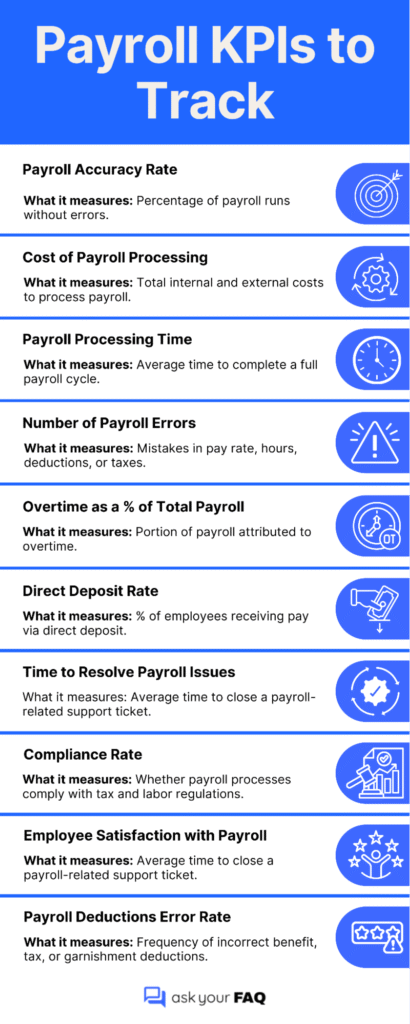
Measuring Payroll Performance
While payroll accuracy is essential, tracking how well the system performs over time is equally important. Measuring payroll metrics shows whether the process is efficient, timely, and cost-effective.
Improving Payroll Efficiency
Payroll is more than just processing salaries; it connects finance, compliance, and employee trust. From understanding forms and deductions to managing benefits and resolving issues, every part plays a crucial role in ensuring accurate and timely compensation. Knowing what to expect, where to look, and how to act can make payroll more transparent and more efficient for everyone involved.
Whether you’re looking for new hire paperwork or reviewing tax withholdings, staying informed is crucial to avoiding costly mistakes and ensuring your payroll process supports both people and operations.