

Getting started with AI can feel confusing. The tools change fast, pricing models are often unclear, and one wrong decision can lead to wasted budgets, poor adoption, or systems that don’t actually solve your problem. Many people aren’t sure which AI tools they truly need, how much they should expect to pay, or how to implement AI without disrupting existing workflows.
This AI FAQ is designed to answer those questions clearly and practically. It explains how different AI tools work, what pricing structures to watch for, and what matters most when implementing AI for the first time.
Each question focuses on real challenges businesses and individuals face when adopting AI, helping you make confident, informed decisions without hype, confusion, or costly mistakes.
AI Basics
1. What is AI?
Artificial intelligence (AI) refers to technology that allows machines to perform tasks that typically require human intelligence. These tasks include understanding language, recognizing patterns, generating content, and assisting with decision-making. AI systems use data and algorithms to analyze information and produce results, often at greater speed and scale than humans.
2. What is AI used for today?
AI is used across many everyday applications and industries, including:
- Writing and summarizing documents
- Answering questions and searching for information
- Customer service and chat support
- Data analysis and reporting
- Image, video, and audio generation
- Coding assistance and debugging
- Workflow automation and task management
Most modern AI tools focus on improving efficiency, reducing repetitive work, and supporting human decision-making rather than replacing it.
3. What is the difference between AI, machine learning, and deep learning?
AI is the broad category that includes many techniques for making machines intelligent. Machine learning is a subset of AI that allows systems to learn patterns from data instead of relying only on fixed rules. Deep learning is a further subset of machine learning that uses layered neural networks to handle complex tasks such as speech recognition, image analysis, and natural language understanding.
4. What is generative AI?
Generative AI is a type of AI designed to create new content. This can include text, images, audio, video, or code. Instead of simply analyzing existing data, generative AI produces original outputs based on patterns learned during training. Examples include AI writing assistants, image generators, and code-generation tools.
5. What is an AI assistant?
An AI assistant is a generative AI tool that can understand natural language requests and generate helpful responses. AI assistants can draft emails, summarize documents, answer questions, and assist with a wide range of tasks. Unlike basic chatbots, AI assistants can handle open-ended requests and adapt to context.
Choosing the Right AI Tool
6. What problem should I solve first with AI?
The best way to start with AI is to focus on one specific, practical problem. Good first use cases usually share these characteristics:
- The task is repetitive or time-consuming
- Errors are low-risk and easy to catch
- Results can be measured clearly
Common starting points include writing assistance, meeting summaries, customer support responses, internal knowledge search, and content drafting.
7. How does AI actually work behind the scenes?
AI systems work by analyzing large amounts of data to identify patterns. They use algorithms to process inputs, compare them to what they’ve learned, and generate outputs such as text, predictions, or recommendations. While AI can appear intelligent, it does not “think” or understand information the way humans do; it predicts likely outcomes based on data.
8. Does AI learn on its own over time?
Some AI systems improve as they process more data, but they do not learn independently like humans. Most updates, improvements, and retraining happen through controlled processes managed by developers or vendors. The way learning occurs depends on the specific AI model and how it is designed.
9. Is AI the same as automation?
No. Automation follows predefined rules to complete tasks, while AI can adapt to different inputs and generate responses. Many modern tools combine automation and AI, for example, an automated workflow that uses AI to draft responses or analyze data before triggering the next step.
10. What types of AI tools are available?
AI tools generally fall into a few main categories:
- General-purpose AI assistants
- Document and knowledge-based AI tools
- Customer support and chat AI
- Marketing and content generation tools
- Coding and development assistants
- Image, video, and audio generation tools
- Workflow automation tools
- Analytics and forecasting tools
Understanding which category fits your needs helps narrow your options quickly.
11. How do I choose the right AI tool for my needs?
Choosing the right AI tool depends on several factors:
- What task do you want the AI to perform
- How accurate and consistent the output needs to be
- Whether the tool must work with your internal documents or systems
- Integration with existing software
- Security, privacy, and access controls
- Pricing and long-term scalability
The right tool should fit naturally into your workflow rather than creating extra work.
12. Should I choose a general AI tool or a specialized one?
General AI tools are best for broad tasks such as writing, summarizing, brainstorming, and basic research. Specialized AI tools are better suited for focused use cases like customer support, legal review, healthcare documentation, or coding. Many organizations use both a general assistant for everyday tasks and specialized tools for critical workflows.
13. Can I use more than one AI tool?
Yes. Many people use multiple AI tools for different purposes. The key is to avoid unnecessary overlap. Each tool should have a clear role, and teams should understand which tool to use for which task to prevent confusion or data risks.
14. Do I need technical knowledge to use AI tools?
Most modern AI tools are designed for non-technical users. You typically interact with them using natural language, similar to writing an email or asking a question. While technical teams may handle integrations or advanced configurations, everyday users usually don’t need coding skills.
15. How do I know if an AI tool will work for my industry?
Look for tools that clearly explain their use cases, limitations, and customer examples. Industry-specific features, compliance support, and terminology often indicate whether a tool is suited for healthcare, finance, education, or other regulated environments.
16. Can small businesses and individuals benefit from AI, or is it only for large companies?
AI is not just for large organizations. Many tools are affordable and useful for individuals, freelancers, and small businesses. AI can help with writing, research, scheduling, customer communication, and basic analytics, often saving time without requiring large budgets.
17. How long does it take to see results from using AI?
Results can appear quickly for simple tasks like drafting content or summarizing information. More complex use cases, such as customer support optimization or workflow automation, may take weeks or months to refine and measure. Starting small helps achieve faster wins.
AI Pricing and Costs
18. Is AI free to use?
Some AI tools offer free versions with limited features or usage caps. However, most useful AI tools require paid plans. Costs vary depending on features, usage levels, and security controls. Free tools may be helpful for testing, but paid plans are usually necessary for consistent or professional use.
19. How are AI tools priced?
AI pricing is typically structured in one or more of the following ways:
- Monthly or annual subscription per user
- Usage-based pricing based on volume
- Token-based pricing for text input and output
- Tiered plans with feature limits
- Custom enterprise pricing
Understanding the pricing model is important to avoid unexpected costs as usage grows.
20. What is token-based pricing?
Token-based pricing charges are based on how much text the AI processes and generates. Longer prompts, larger documents, and detailed outputs use more tokens and increase costs. This pricing model is common for AI tools that handle large amounts of text.
21. What additional costs should I expect when using AI?
Beyond subscription fees, additional costs may include:
- Time spent training users
- Workflow changes and process redesign
- System integrations
- Ongoing review and quality checks
- Governance and compliance management
These costs are often overlooked but can significantly impact total investment.
22. How can I estimate whether AI is worth the cost?
To evaluate value, consider:
- Time saved on routine tasks
- Faster turnaround times
- Reduced errors or rework
- Increased productivity without added staff
- Improved consistency and quality
Comparing results before and after AI adoption helps determine real return on investment.
23. Why do AI tool prices vary so widely?
Pricing differences reflect factors such as model quality, infrastructure costs, security features, integrations, customer support, and enterprise controls. Lower-cost tools may limit usage or features, while higher-priced tools often include stronger governance and reliability.
24. Can AI costs increase unexpectedly?
Yes. Usage-based and token-based pricing models can lead to higher costs if usage grows faster than expected. Monitoring usage and setting limits helps prevent budget surprises.
25. Are annual AI plans better than monthly plans?
Annual plans often offer lower per-user pricing but require longer commitments. Monthly plans provide flexibility but may cost more over time. The best option depends on how confident you are in long-term adoption.
26. Is it better to start with free AI tools before paying?
Free tools are useful for experimentation and learning, but they often lack reliability, security, and consistency. Paid tools are usually necessary for professional, business, or long-term use.
Implementing AI Successfully
27. What are the first steps to implementing AI?
Successful implementation usually follows these steps:
- Identify a clear use case
- Choose the appropriate AI tool
- Set rules for acceptable use
- Run a small pilot
- Train users with examples
- Measure results before expanding
Starting small reduces risk and builds confidence.
28. What does a successful AI pilot look like?
A good AI pilot has:
- A limited scope and timeline
- Clear success metrics
- A defined group of users
- Regular feedback and adjustments
- A decision point to expand, revise, or stop
Pilots help uncover issues before full rollout.
29. What is prompt writing, and why does it matter?
Prompt writing is the way you communicate instructions to an AI tool. Clear, structured prompts help AI produce more accurate and useful results. Poor prompts often lead to vague or incorrect outputs, even with powerful tools.
30. How do I write better AI prompts?
Effective prompts usually include:
- A clear task or role
- Relevant context or background
- Specific instructions
- Desired output format
- Constraints such as tone or length
Well-written prompts improve consistency and reliability.
31. How do I train my team to use AI effectively?
Training should focus on practical examples, not theory. Showing real prompts, common mistakes, and approved use cases helps users feel confident. Ongoing support and shared templates improve consistency over time.
32. How do I integrate AI into daily workflows without slowing people down?
AI works best when embedded into tools people already use, such as email, document editors, customer support systems, or messaging platforms. If AI adds extra steps or complexity, adoption will suffer.
33. How do I measure whether AI adoption is successful?
Success can be measured through time saved, task completion speed, output quality, reduced errors, or user satisfaction. Clear metrics should be defined before rollout so results can be evaluated objectively.
34. What happens if AI adoption fails?
If adoption is low or results are disappointing, it often means the use case was unclear, training was insufficient, or the tool didn’t fit the workflow. Adjusting scope, prompts, or tools is usually more effective than abandoning AI entirely.
Accuracy, Privacy, and Risk
35. Can AI make mistakes?
Yes. AI can generate incorrect or misleading information. These errors, sometimes called hallucinations, occur because AI predicts responses based on patterns rather than verifying facts. Human review is essential for important decisions.
36. How can I reduce AI errors?
Ways to reduce errors include:
- Using clear and specific prompts
- Limiting the scope of requests
- Grounding AI responses in trusted documents
- Requiring human review for critical outputs
- Monitoring performance over time
AI works best as a support tool, not a sole authority.
37. Is it safe to enter sensitive information into AI tools?
Not always. Some AI tools store user inputs or use them for training. Sensitive, confidential, or regulated data should only be used in tools that clearly state how data is protected, stored, and deleted.
38. What security questions should I ask before using an AI tool?
Important questions include:
- Is my data stored or retained?
- Is my data used for training models?
- How is data encrypted?
- Who has access to my data?
- Are there audit logs or access controls?
- What compliance standards are met?
Clear answers help reduce risk.
39. Should AI replace human decision-making?
No. AI should support human judgment, not replace it. Humans remain responsible for oversight, interpretation, and final decisions, especially in areas involving ethics, safety, or legal responsibility.
40. Can AI be biased?
Yes. AI can reflect biases present in its training data. This can affect hiring tools, content generation, recommendations, or analysis. Awareness, human oversight, and diverse data sources help reduce bias-related risks.
41. Should AI-generated content be disclosed?
Disclosure depends on context, industry standards, and regulations. In some settings, such as education, journalism, or regulated industries, transparency may be required or expected. Clear internal guidelines help ensure consistent practices.
42. Is AI legally responsible for its outputs?
No. Responsibility typically lies with the user or organization deploying the AI. This is why review processes and accountability frameworks are important, especially for public-facing or regulated outputs.
Ongoing Use and Support
43. What skills do people need to use AI effectively?
Key skills include:
- Basic AI literacy
- Prompt writing
- Critical thinking and review
- Understanding data sensitivity
- Willingness to adapt workflows
These skills are often more important than technical expertise.
44. How often should I review my AI tools and costs?
AI tools evolve quickly. Reviewing tools, usage, and pricing at least quarterly helps ensure they still meet your needs and remain cost-effective.
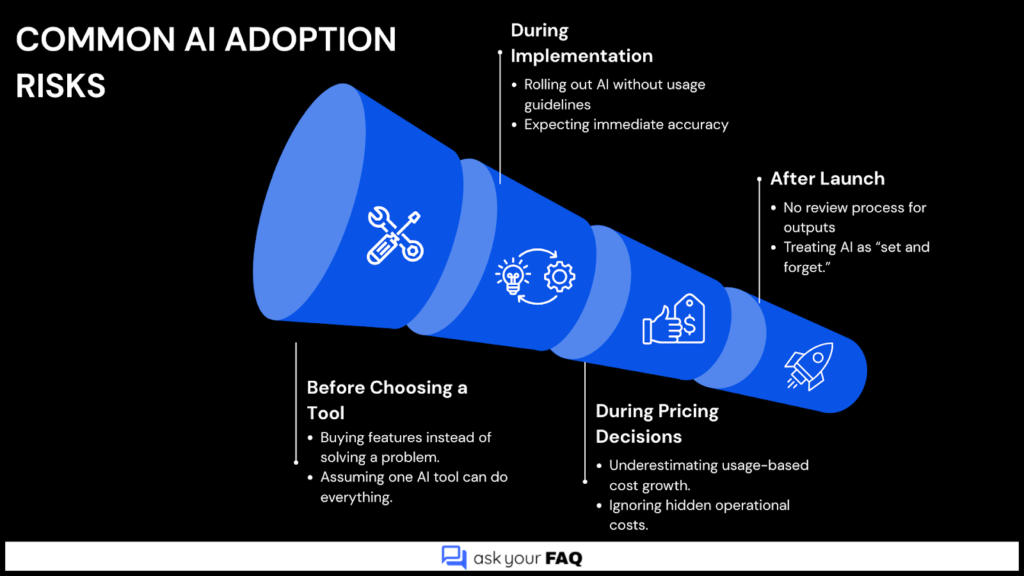
45. What are the most common mistakes people make with AI?
Common mistakes include:
- Choosing too many tools at once
- Lacking clear goals or metrics
- Ignoring data privacy risks
- Skipping training
- Trusting outputs without review
- Scaling too quickly
Avoiding these mistakes improves long-term success.
46. Who should seek help before implementing AI?
Organizations handling sensitive data, regulated industries, large teams, or complex workflows should seek guidance before full AI adoption. Early support helps prevent costly mistakes and compliance issues.