
If you are here, you are not looking for abstract technical definitions. You want clarity. You want to understand what online threats actually look like, how serious they are, and what practical steps reduce risk.
Cybersecurity concerns often begin with something small. A suspicious email. An unexpected login alert. News of a company data breach. Or simply the realization that digital risk is growing.
This FAQ guide addresses the most common online threats, essential protection tools, practical safety habits, and realistic data protection strategies. The answers are direct, structured, and focused on real-world applications—organized in a way similar to Yonyx Interactive Decision Trees to help you navigate complex scenarios step-by-step.
Fundamentals of Cybersecurity
1. What is cybersecurity?
Cybersecurity is the practice of protecting systems, networks, devices, and data from unauthorized access, disruption, theft, or damage.
It includes technical controls such as encryption and firewalls, organizational policies, monitoring systems, and user awareness training.
Cybersecurity is not a product. It is continuous risk management.
2. Why is cybersecurity important for individuals and businesses?
For individuals, it protects:
- Financial accounts
- Personal identity
- Medical and tax records
- Private communications
For businesses, it protects:
- Customer data
- Intellectual property
- Operational continuity
- Brand reputation
A single breach can trigger financial losses, regulatory penalties, and long-term trust damage.
3. What are the core principles of cybersecurity?
Cybersecurity is built around three core principles known as the CIA triad:
- Confidentiality: Only authorized users can access data.
- Integrity: Data remains accurate and unaltered.
- Availability: Systems and data remain accessible when needed.
Most security controls are designed to protect one or more of these principles.
4. What is the difference between a cyber threat, a cyber attack, and a cyber incident?
- Cyber threat: A potential risk or vulnerability that could be exploited.
- Cyber attack: An active attempt to exploit a vulnerability.
- Cyber incident: Any event that compromises security, whether intentional or accidental.
Clear distinctions improve response planning and reporting accuracy.
Common Online Threats
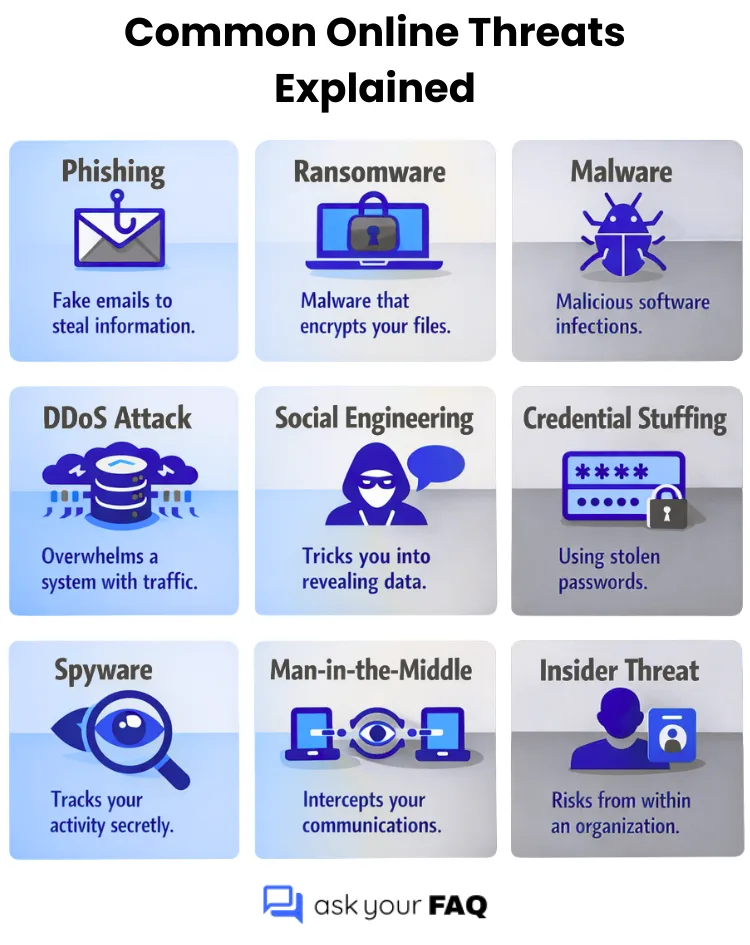
Below are the most frequently encountered digital threats affecting both individuals and organizations.
5 . What are the most common cyber attacks today?
The most common attacks include:
- Phishing
- Business Email Compromise
- Ransomware
- Malware infections
- Credential theft
- Identity fraud
- Distributed Denial of Service attacks
They persist because they exploit both technical weaknesses and human behavior.
6. What is phishing?
Phishing is a fraudulent attempt to steal information by impersonating trusted entities.
Common examples include:
- Fake banking alerts
- Delivery notification scams
- Payroll impersonation
- Government payment messages
The goal is typically credential theft or financial fraud.
7. What is Business Email Compromise (BEC)?
Business Email Compromise is a targeted scam where attackers impersonate executives, vendors, or finance teams to request fraudulent payments or sensitive information.
Unlike generic phishing, BEC attacks are highly personalized and often bypass spam filters. They are among the most financially damaging cybercrimes.
8. What should I do if I click on a phishing link?
If no credentials were entered:
- Disconnect from the internet
- Run a full security scan
If credentials were entered:
- Change passwords immediately from a secure device
- Enable multi-factor authentication
- Monitor financial and email accounts
- Notify your organization’s IT team if applicable
Quick action limits damage.
9. What is ransomware?
Ransomware is a type of malicious software (malware) that encrypts a victim’s data, files, or devices, rendering them unusable. Attackers then demand a ransom payment, usually in cryptocurrency, in exchange for a decryption key to restore access. These attacks often disrupt critical operations, cause financial loss, and can lead to data theft.
10. What is malware?
Malware is a broad term for malicious software, including:
- Viruses
- Trojans
- Spyware
- Ransomware
It spreads through attachments, compromised websites, or malicious downloads and can steal data or damage systems.
11. What is identity theft in cybersecurity?
Identity theft occurs when someone steals your personal information and uses it to commit fraud or impersonate you.
The stolen data may include your name, Social Security number, bank details, or login credentials. Attackers typically obtain this information through data breaches, phishing scams, malware, or weak password practices.
Once exposed, criminals may open credit accounts, access financial records, or conduct transactions in your name, leading to financial loss and long-term credit damage.
12. What is a DDoS attack?
A Distributed Denial of Service, or DDoS, attack floods a website, server, or network with massive amounts of traffic from multiple compromised devices.
The goal is to overwhelm the system so legitimate users cannot access it. This results in downtime, service disruption, and potential financial loss.
13. What is a supply chain attack?
A supply chain attack targets a trusted third-party vendor or software provider to gain access to multiple downstream organizations.
Instead of attacking one company directly, attackers compromise widely used software or services.
14. What is an insider threat?
An insider threat occurs when someone with authorized access to systems or data misuses that access in a way that compromises security.
This can be intentional, such as stealing confidential information, or unintentional, such as accidentally exposing sensitive data through poor security practices. Because insiders already have legitimate access, these threats can be difficult to detect and can cause significant damage.
15. What are black hat, white hat, and gray hat hackers?
Black hat hackers engage in illegal activity for financial gain or disruption.
White hat hackers are ethical professionals who test systems to strengthen defenses.
Gray hat hackers operate between legal and illegal boundaries, sometimes exposing vulnerabilities without permission.
Ethical testing plays a legitimate role in cybersecurity.
16. How is artificial intelligence used in cyber attacks?
AI is now used to:
- Generate highly convincing phishing emails
- Create deepfake voice scams
- Automate vulnerability scanning
- Launch adaptive malware
At the same time, AI also strengthens defensive detection systems.
Security Tools and Technical Protection
17. What is a firewall?
A firewall is a security system that monitors incoming and outgoing network traffic and blocks or allows connections based on predefined rules.
It acts as a barrier between trusted internal networks and untrusted external networks, such as the internet. By filtering traffic, a firewall helps prevent unauthorized access, malicious activity, and certain types of cyber attacks before they reach your systems.
18. Is a firewall enough?
No. Effective protection requires layered security, including:
- Encryption
- Access controls
- Endpoint protection
- Monitoring systems
- User training
Layered defense reduces single-point failure risk.
19. What is a VPN?
A Virtual Private Network encrypts internet traffic and hides your IP address.
It is particularly useful when:
- Using public Wi-Fi
- Accessing corporate systems remotely
20. What is encryption?
Encryption is the process of converting readable data into coded text so that only authorized parties with the correct decryption key can access it.
It protects sensitive information such as financial records, emails, and stored files by making intercepted data unusable to attackers. Encryption is used both when data is being transmitted over networks and when it is stored on devices or in the cloud.
21. What is the difference between encryption and hashing?
Encryption is reversible with a key and protects data storage and transmission.
Hashing is a one-way transformation commonly used for password storage. Even if breached, hashed passwords are harder to exploit.
22. What is multi-factor authentication?
Multi-factor authentication requires two or more verification factors, such as:
- Password plus one-time code
- Password plus biometric
- Password plus hardware token
It significantly reduces unauthorized access risk.
23. What is endpoint security?
Endpoint security refers to the protection of individual devices such as laptops, desktops, smartphones, and tablets that connect to a network.
These devices, known as endpoints, are common entry points for cyber attacks. Endpoint security solutions monitor, detect, and block threats on each device to prevent malware infections, unauthorized access, and data breaches.
24. What is cloud security?
Cloud security protects data, applications, and infrastructure in cloud environments.
It includes identity management, encryption, logging, monitoring, and compliance controls.
Cloud platforms can be secure, but misconfiguration remains a major risk.
25. What is a password manager, and should I use one?
A password manager securely stores and generates strong, unique passwords.
Using one reduces password reuse, which is a leading cause of account compromise. For most individuals and businesses, a reputable password manager improves overall security posture.
Safety Practices and Cyber Hygiene
26. What is cyber hygiene?
Cyber hygiene refers to routine security habits that reduce long-term risk.
It includes:
- Updating software
- Using strong passwords
- Monitoring accounts
- Avoiding suspicious links
Most breaches exploit neglected basics.
27. How can I improve my cyber hygiene?
Adopt consistent habits:
- Use long, unique passwords
- Enable multi-factor authentication
- Install updates promptly
- Back up important data
- Review account activity regularly
Consistency provides more protection than occasional advanced measures.
28. How often should software be updated?
Software should be updated as soon as security patches and updates are released.
Many updates fix newly discovered vulnerabilities that attackers actively exploit. Delaying updates increases the window of exposure. Enabling automatic updates, when possible, helps ensure systems remain protected without relying on manual action.
29. What makes a strong password?
A strong password is:
- Long
- Unique
- Random
- Free from personal information
Password managers simplify secure generation and storage.
30. How can I secure my home Wi-Fi network?
- Change default router credentials
- Enable modern encryption standards
- Update firmware regularly
- Disable unused services
31. How can I tell if my device has been compromised?
Warning signs include:
- Unknown software
- Unusual login alerts
- Slower performance
- Suspicious account activity
Disconnect the device, reset credentials from a secure device, and run a security scan.
32. How can employees be trained to recognize threats?
Training should focus on real-world examples such as:
- Recognizing phishing patterns
- Verifying unusual payment requests
- Reporting suspicious activity
Regular simulations and refreshers improve resilience.
Data Protection and Compliance
33. What steps protect sensitive customer data?
Organizations should:
- Encrypt stored and transmitted data
- Limit access by role
- Monitor access logs
- Conduct regular risk assessments
- Maintain secure backups
34. What is the principle of least privilege?
The principle of least privilege means users are granted only the minimum level of access necessary to perform their job responsibilities.
By limiting permissions, organizations reduce the potential impact if an account is compromised. It prevents unnecessary exposure of sensitive systems and data.
35. What is data loss prevention?
Data loss prevention, or DLP, refers to tools and policies designed to detect and prevent unauthorized sharing, transfer, or exposure of sensitive information.
DLP systems monitor emails, file transfers, cloud storage, and endpoints to stop confidential data from leaving the organization without approval.
36. How should sensitive data be stored?
Sensitive data should be stored using strong encryption and strict access controls to ensure only authorized users can access it.
It should also be regularly backed up, monitored for unusual access activity, and protected with secure storage systems that meet industry security standards.
37. What is data anonymization?
Data anonymization is the process of removing or modifying personally identifiable information so individuals cannot be identified.
This allows organizations to analyze data for insights while reducing privacy risks and regulatory exposure.
38. How long should businesses retain customer data?
Businesses should retain customer data only for as long as necessary to meet legal, regulatory, or operational requirements.
Keeping data longer than needed increases the risk of exposure during a breach and may violate data protection regulations.
39. How can businesses comply with data protection regulations?
Compliance requires:
- Identifying applicable laws such as GDPR, HIPAA, or CCPA
- Conducting risk assessments
- Documenting security controls
- Reporting breaches when required
Regulatory compliance supports structured risk management.
Incident Response and Recovery
40. What should I do after a data breach?
Immediate priorities include:
- Contain the breach
- Identify the cause
- Preserve evidence
- Assess exposed data
- Notify affected parties
- Report to regulators if required
- Reset credentials
- Strengthen defenses
Preparation reduces long-term damage.
41. What is a cyber incident response plan?
It is a documented framework outlining how an organization detects, responds to, and recovers from security incidents.
Clear roles and predefined procedures reduce confusion during crises.
42. What is the average cost of a data breach?
Costs vary by industry and size, but global industry studies consistently show that breaches can result in millions of dollars in combined investigation costs, downtime, regulatory fines, and reputational damage.
Even smaller breaches create significant financial strain.
43. Is cyber insurance necessary?
Cyber insurance is not mandatory for every organization, but it can provide financial protection against losses from data breaches, ransomware attacks, and business interruptions.
It may cover investigation costs, legal fees, regulatory penalties, customer notifications, and recovery expenses. However, insurance does not replace strong cybersecurity controls.
Most insurers require proof of baseline security measures before issuing coverage, which reinforces that prevention remains the primary defense strategy.
44. Why are regular data backups critical?
Regular data backups are critical because they allow you to recover quickly from ransomware, hardware failure, accidental deletion, or system errors.
Without backups, lost data may be permanent. With properly stored and tested backups, you can restore operations, reduce downtime, and limit financial and reputational damage.
Backups should be automated, encrypted, and stored separately from primary systems.
45. How can small businesses protect themselves?
Small businesses should:
- Enforce strong password policies
- Enable multi-factor authentication
- Use secure cloud platforms
- Train employees regularly
- Maintain backups
Basic controls significantly reduce risk.
46. How can I check if my data was exposed in a breach?
- Review official breach notifications
- Use reputable breach-checking services
- Monitor financial statements and credit reports
- Reset exposed passwords immediately
Early detection limits fraud risk.
47. How do I choose a cybersecurity provider?
Evaluate:
- Certifications and experience
- Incident response capability
- Service scope
- Transparent pricing
- Defined service-level agreements
Avoid vendors promising absolute protection. Risk can be reduced, not eliminated.
48. How can individuals stay updated on cybersecurity threats?
- Enable automatic updates
- Follow trusted security advisories
- Review account alerts regularly
- Monitor credible technology sources
Awareness often prevents incidents before technical controls engage.
49. What is zero-trust security?
Zero trust security is a framework based on the principle of “never trust, always verify.” It assumes that no user, device, or system—inside or outside the network—should be automatically trusted.
Every access request must be authenticated, authorized, and continuously validated. This model reduces the risk of lateral movement within networks if credentials are compromised and is increasingly adopted in modern enterprise environments.
50. What is social engineering in cybersecurity?
Social engineering is the psychological manipulation of individuals to trick them into revealing confidential information or performing actions that compromise security.
Unlike purely technical attacks, social engineering exploits human behavior, trust, urgency, or fear. Examples include impersonation calls, fake technical support scams, and fraudulent payment requests. Awareness training is the primary defense.
51. What is penetration testing?
Penetration testing (pen testing) is a controlled security assessment where ethical security professionals simulate real-world attacks to identify vulnerabilities. The goal is to discover weaknesses before malicious attackers do.
Findings are documented in a report that outlines risks, exploitation paths, and remediation steps. Regular testing strengthens overall security posture.
52. What is a security operations center (SOC)?
A Security Operations Center (SOC) is a centralized team responsible for continuously monitoring, detecting, analyzing, and responding to cybersecurity threats.
SOC teams use advanced monitoring tools, threat intelligence, and incident response procedures to identify suspicious activity in real time. For larger organizations, a SOC is a critical component of proactive defense and rapid incident containment.
Final Considerations
Cybersecurity is continuous risk management.
The objective is not perfection.
The objective is risk reduction.
Technology, awareness, access control, and monitoring must work together.
Whether protecting personal accounts or managing enterprise systems, consistent preventive measures significantly reduce exposure to modern online threats.
Related Reads
Carnival Cruise FAQ: What to Know Before You Sail
Medicare FAQ: Simple Answers for First-Time Enrollees
Business Loan FAQ: Everything You Need to Know Before Applying