
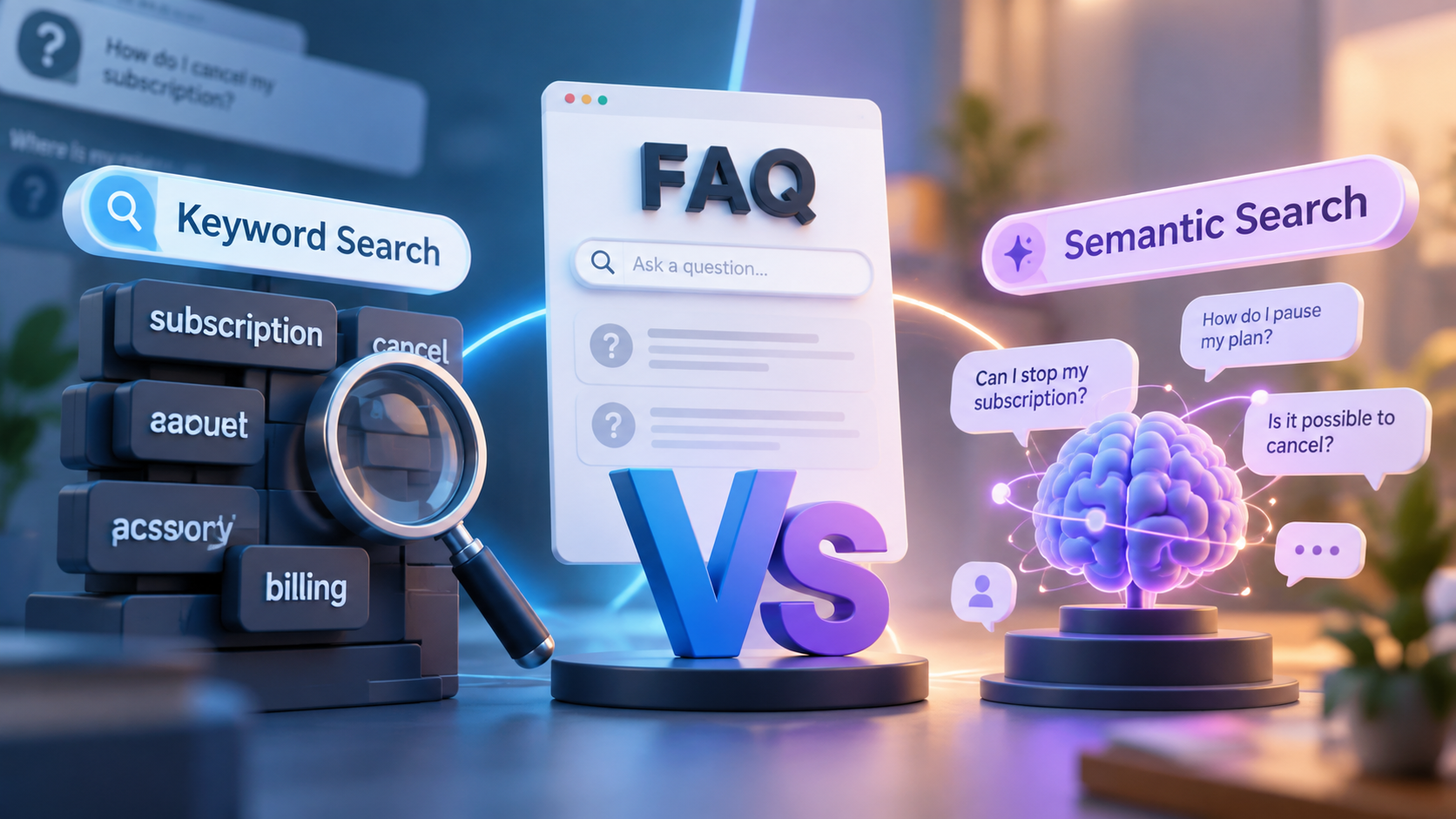
The FAQ writer did their job. The answer is accurate, the page is live, and the customer asks a perfectly reasonable question.
Yet search still returns the wrong result.
Suppose your FAQ says, “Can I pause my subscription?” A customer searches, “Can I stop paying for a couple of months without closing my account?”
To a person, those questions clearly point to the same need. To a search system, however, the connection depends on how that system interprets language.
That is where semantic search vs keyword search becomes more than a technical comparison. Keyword search relies mainly on the words someone enters. Semantic search looks at the meaning behind those words and tries to understand what the person actually wants.
For FAQ search, that difference matters because customers rarely know the exact wording used by the person who wrote your help content. They know the problem they need solved.
TL;DR
| Keyword search works well when users know the exact term they need, such as a product name, feature, model number, or error code. Semantic search is better suited to synonyms, paraphrases, and conversational questions.For customer-facing FAQs, semantic understanding is often more useful because visitors know their problem, not necessarily your terminology. Keyword matching still matters when exact wording carries meaning, and some search systems combine both approaches when a query contains both exact terms and conversational language. |
What Is Keyword Search?
Keyword search retrieves information by comparing terms in a user’s query with terms in indexed content. It is also commonly called lexical search.
If your FAQ contains:
How do I cancel my subscription?
and someone searches:
cancel subscription
the connection is easy to make because the important words overlap.
Now change the query to:
How do I stop being charged every month?
The intent may still be cancellation, but “cancel” and “subscription” have disappeared. A sophisticated keyword system may account for spelling variations, related word forms, fuzzy matching, or configured synonyms, but it still has less direct wording to work with.
This is also why AI search and full-text search can behave differently when customers express the same need in different ways. The further their language moves from the words stored in the FAQ, the more work a literal matching system has to do.
How Keyword Search Matches FAQ Questions
Keyword systems typically index the words that appear across a collection of documents. When someone searches, the system compares the query with that index, retrieves documents containing relevant terms, and ranks the results.
Modern lexical search is more capable than simply checking whether two sentences contain identical words. Depending on the implementation, it may consider phrase matches, word frequency, spelling variations, or predefined synonyms.
Still, the terms appearing in the query remain an important relevance signal.
That makes keyword search predictable. If a customer already knows the exact name of a feature, subscription plan, product, or error message, the search engine has something very specific to look for.
Consider searches such as:
- ERR-401
- “Business Plus”
- “XT-200”
- a named product feature
- a SKU
- a specific policy term
In these situations, exact wording is useful rather than restrictive. Someone searching ERR-401 probably wants information about that particular error, not a collection of pages discussing generally similar login problems.
Keyword search therefore remains valuable even as semantic search becomes more common. It is particularly strong when the query itself contains the precise information needed to identify the answer.
What Is Semantic Search?
Semantic search retrieves information based on the meaning and intent behind a query rather than relying only on literal word matches.
Suppose your FAQ says:
How do I change the email address associated with my account?
A customer asks:
I signed up with the wrong email. How do I fix it?
Very few words match, but the underlying need is closely related. Both questions concern changing the email associated with an account.
Semantic search is designed to recognize that relationship.
Google Cloud’s explanation of semantic search describes it as an approach that considers contextual meaning and user intent instead of depending only on literal keywords.
For a support or content team, however, the practical question is simpler:
Can customers ask in their own words and still reach the answer you already wrote?
How Semantic Search Understands Meaning
You do not need to understand the mathematics behind semantic search to understand how it changes the search experience.
A semantic system examines the query to identify the concepts and likely intent behind it. It then compares that meaning with the content available in its search index and ranks answers according to how closely they relate to what the customer appears to be asking.
Many modern semantic systems use embeddings, which are numerical representations of text designed to preserve relationships in meaning. This makes it possible to compare two differently worded pieces of text based on conceptual similarity rather than only shared vocabulary.
Consider an FAQ about:
two-factor authentication reset
A customer may never use those terms. Instead, they might search:
I changed phones and can’t get my login code.
From a keyword perspective, the overlap is weak. The customer’s query contains none of the terms “two-factor,” “authentication,” or “reset.”
From a meaning perspective, however, the two can describe the same support problem.
That ability to connect related concepts is one of the main differences between semantic retrieval and traditional lexical retrieval.
Why Different Words Can Lead to the Same FAQ Answer
Consider these three questions:
- “Can I update my login email?”
- “How do I change the email on my account?”
- “I registered with the wrong email. Can I replace it?”
A support agent would probably route all three customers to the same answer.
Semantic search attempts to make that same connection automatically.
For natural language search, this removes an unnecessary burden from the visitor. Customers do not have to reverse-engineer your FAQ and guess how your product or support team described the issue.
They can describe what they need using language that feels natural to them.
That is especially important for support content because customers often begin with the situation they are facing rather than the formal name of the feature or process that solves it.
Semantic Search vs Keyword Search: What’s the Difference?
At the simplest level, keyword search focuses on wording while semantic search focuses on meaning.
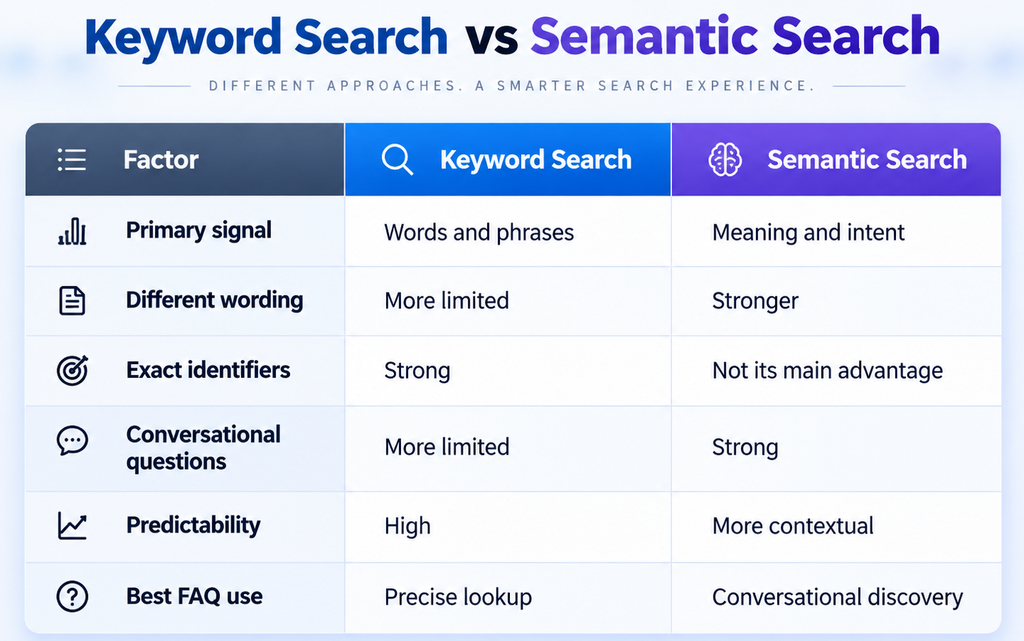
The distinction is not that one technology is “smart” while the other is outdated. They solve different retrieval problems.
Imagine a SaaS customer needs to transfer ownership of a former employee’s projects. Your product calls the feature “workspace reassignment,” but the customer does not know that.
They search:
One of our employees left. How do I give their projects to someone else?
Here, semantic understanding is useful because the person knows the outcome they need but not the terminology behind it.
A developer searching ERR-A104, on the other hand, already knows the precise identifier. Exact matching may provide the better signal.
The important question is therefore not simply which technology is more advanced. It is whether the retrieval method fits the way people actually search your content.
Why FAQ Search Exposes the Limits of Exact Keyword Matching
FAQ content creates a particular search challenge because the same customer need can be expressed in many reasonable ways.
A product team may describe something one way. A support agent may use another phrase. A customer may use completely different language based on what happened to them.
The answer does not change, but the wording around the answer does.
For an FAQ search experience, that creates a vocabulary gap. The content author knows the terminology because they created the documentation. The customer may be seeing that terminology for the first time.
One FAQ, Five Customer Questions: What Does Each Search Method Find?
Suppose your FAQ contains:
How can I change the email address associated with my account?
Five customers may search for that information in five different ways.
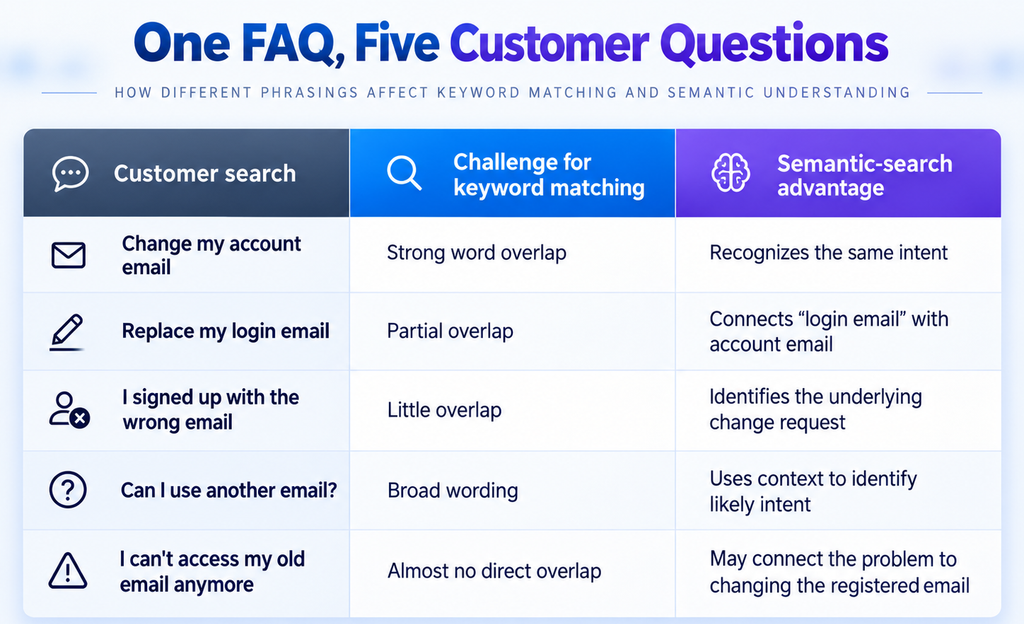
These examples illustrate likely retrieval behavior rather than guaranteed results from every search engine. Actual performance depends on the technology being used and the quality of the content available.
The pattern becomes clearer as the queries move further away from the original FAQ wording.
“Change my account email” gives keyword search several direct signals. “I can’t access my old email anymore,” however, does not even explicitly state that the customer wants to change anything. It describes the situation that created the need.
This is where semantic search becomes particularly useful. Instead of waiting for customers to reproduce the wording used in the FAQ, it can evaluate whether differently phrased questions point to the same underlying intent.
That is also part of the value of an FAQ chatbot that accepts natural-language questions. Existing answers become easier to reach without requiring visitors to scan every category or repeatedly rewrite their search.
Where Keyword Search Still Has an Edge
Semantic search is useful for varied and conversational questions, but exact matching still matters.
Suppose a customer searches:
ERR-A104
That code may identify one specific problem with one specific troubleshooting process. Returning several semantically related error articles could actually make the experience worse if none of them addresses ERR-A104.
The same principle applies to model numbers, SKUs, plan names, feature names, technical codes, and policy terminology.
In those cases, the exact term is not merely a clue to intent. It is the information the customer is looking for.
That is where lexical search retains a clear advantage. Semantic similarity helps when language varies; exact matching helps when language needs to remain precise.
Semantic Search or Keyword Search: Which Should Your FAQ Use?
Start with how your customers actually search.
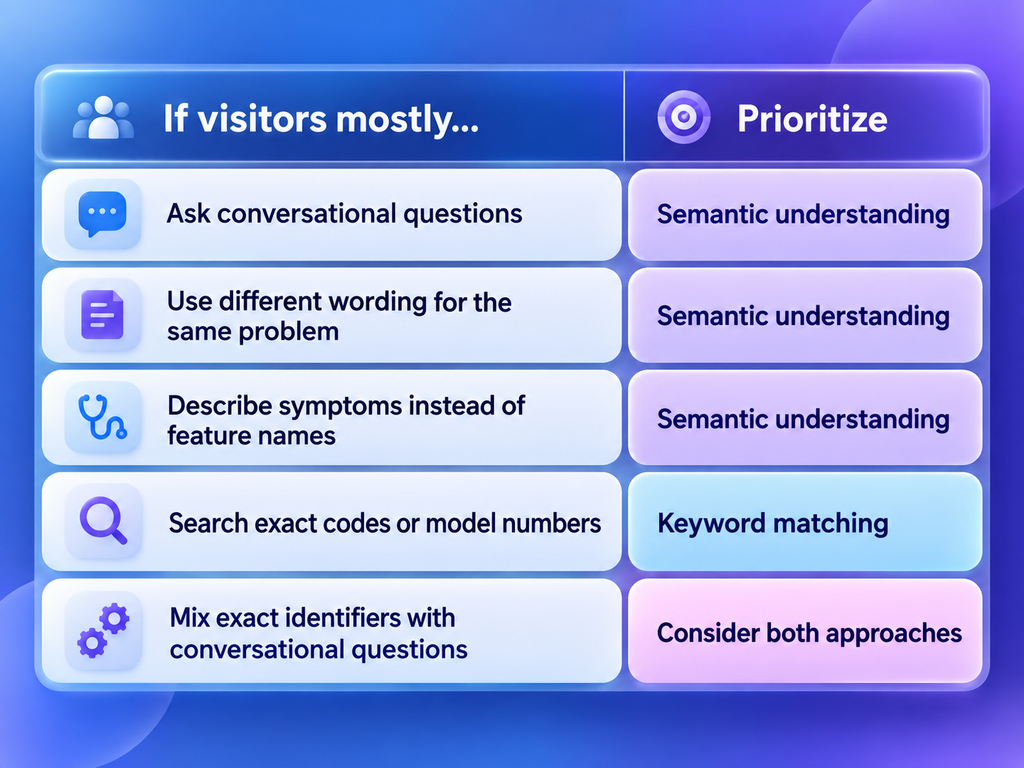
A SaaS FAQ covering billing, account access, configuration, onboarding, and troubleshooting is likely to receive considerable variation in wording. Customers often know what happened but not what the underlying feature or process is called.
Semantic understanding can help bridge that gap.
A technical support site where visitors regularly search model numbers, error codes, or known product names may place more value on exact keyword matching.
Many FAQ environments contain both behaviors.
Some search systems therefore combine keyword and semantic retrieval instead of choosing only one. This is commonly called hybrid search.
For example:
Why does my XT-200 keep disconnecting from Wi-Fi?
XT-200 benefits from exact keyword matching because it identifies a specific product. “Keeps disconnecting from Wi-Fi” benefits from semantic understanding because the same issue might be described elsewhere as an “unstable wireless connection” or “intermittent Wi-Fi.”
A hybrid approach can consider both signals. For FAQ environments that regularly receive exact identifiers alongside conversational questions, that combination can be useful.
So instead of asking:
Which search technology is better?
Start with a more practical question:
How do our customers actually ask for help?
Test Your FAQ Search With Real Customer Language
You do not need an elaborate technical benchmark to find obvious weaknesses in your current FAQ search.
Choose ten FAQs that customers use frequently.
For each one, test four versions of the question:
- Search using the exact FAQ wording.
- Replace important terms with synonyms.
- Describe the underlying problem without using your company’s terminology.
- Ask the question conversationally, as a customer might type it into chat.
For example:
Published FAQ:
How do I change my account email?
Synonym:
How do I update my login email?
Problem description:
I registered with the wrong email.
Conversational question:
Can I switch the email I used when I signed up?
Now compare the results.
If only the exact wording returns the right answer, the search experience may depend too heavily on lexical overlap.
If differently worded questions return related but incorrect answers, semantic relevance may need tuning.
If none of the searches work even though the correct answer exists, look at indexing and retrieval rather than assuming the content itself is wrong.
You should also pay attention to ranking. Finding the correct answer somewhere on page three is technically different from returning no answer at all, but it may not feel very different to a customer trying to solve a problem quickly.
Larger search teams can formalize this type of testing using measures such as precision, recall, and ranking quality. But the principle remains straightforward: test search with realistic customer language, not only the wording already present in the FAQ.
This gives CX, support, and content teams a much better picture of whether search works for customers rather than whether it works for the people who wrote the content.
Final Thoughts: Test the Language Your Customers Actually Use
Take the ten questions your support team hears most often and search your FAQ without copying the wording from the published questions.
Use phrases customers put in support tickets. Describe the symptoms they mention in chat. Try the shorthand, incomplete questions, and informal wording they naturally use.
If the correct answer exists but becomes difficult to find as soon as the wording changes, the problem may not be the content.
It may be how that content is being retrieved.
A useful FAQ search experience should not require customers to know how your knowledge base was written before they can benefit from what it already knows.
Related Reads
- AI Search vs Full-text Search
- What Is a FAQ Chatbot and How Does It Improve Customer Experience Online
- Best AI Knowledge Base: How to Choose the Right Solution for Enterprise Document Search
- 14 Best FAQ Page Design Tips for a Better User Experience
Frequently Asked Questions
Does semantic search require generative AI?
No. Semantic search and generative AI solve different problems. Semantic search retrieves existing information based on meaning and context, while generative AI creates or reformulates content. A system can use semantic retrieval without generating a new answer, or it can combine retrieval with generative AI afterward.
Is vector search the same as semantic search?
Not exactly. Vector search finds items with similar numerical representations, often called embeddings. Semantic search is the broader goal of retrieving information based on meaning and intent. Vector search is one common technique for supporting semantic retrieval, but the two terms are not interchangeable.
Can semantic search work with a small FAQ database?
Yes. An FAQ does not need thousands of entries before semantic search becomes useful. Even a relatively small collection can contain answers customers ask about in many different ways. Clear, distinct answers and realistic query testing matter more than simply having a large amount of content.
Does semantic search replace FAQ categories?
No. Categories and search solve different navigation needs. Categories help visitors browse related topics, while semantic search helps people who prefer to ask a question directly. A strong FAQ experience can support both rather than forcing every visitor through the same navigation path.
What happens when a semantic search query is ambiguous?
An ambiguous query may appear relevant to several answers. Depending on the implementation, the search experience may show multiple possible results, request clarification, or avoid treating a low-confidence match as certain. Semantic search improves the ability to interpret varied language, but it does not eliminate ambiguity.