
Choosing the best AI knowledge base is not just about adding a chatbot to your workplace. Enterprises need a solution that can search large document libraries, understand natural-language questions, respect user permissions, and return accurate, source-based answers. The right platform should also support existing tools, scale with growing data, reduce search time, and prevent outdated or restricted information from appearing.
This guide explains how to evaluate AI knowledge base solutions for enterprise document search, from security and integrations to retrieval accuracy, maintenance, pricing, and long-term scalability.
| Quick Answer: What Is the Best AI Knowledge Base for Enterprise Document Search? The best AI knowledge base delivers accurate, source-backed answers from enterprise documents using natural-language search. It should integrate with tools like SharePoint, Google Drive, Confluence, and Notion, preserve user permissions, sync updates quickly, and meet security and compliance requirements. The right choice depends on your document volume, workflows, budget, and need for reliable retrieval. |
Strategic & Financial Foundations
1. Why invest in a semantic AI knowledge base instead of keeping our traditional keyword-based search?
A semantic AI knowledge base helps people find the right information faster because it understands what they’re asking, not just the exact words they type. It recognizes similar terms, understands natural language questions, and returns more relevant answers. Compared to traditional keyword search, it saves time, reduces frustration, and makes it easier to discover knowledge across your organization.
2. Why do enterprise platforms charge per-agent seat licensing if the AI handles the bulk of the workload?
Most enterprise AI platforms still charge per agent because people are still part of the process. Employees review AI-generated responses, handle complex situations, and make final decisions when needed. At the same time, many vendors are starting to offer flexible pricing that combines per-user plans with charges based on AI usage or the work AI completes.
3. Which internal teams (e.g., Customer Support, HR, Engineering) will realize the fastest ROI?
Customer support usually sees the fastest ROI, often within 30 to 90 days. AI can handle common questions, reduce ticket volumes, help agents find answers faster, and shorten resolution times. HR often sees results next through fewer repetitive employee requests, while engineering teams usually take longer because the benefits appear gradually through faster development and less duplicated work.
4. Which type of pricing model, per-agent seat or per-AI resolution, is more cost-effective for our scale?
It depends on how your support team works. Per-agent pricing is often the better choice if you have a stable team handling a consistent number of support requests. Per-AI resolution pricing can save money if your business has seasonal demand or many simple questions that AI can resolve on its own. The right model depends on your ticket volume, team size, and how much of your support AI can automate.
5. How many human administrators are typically required to maintain an active database of 1,000 articles?
Most companies only need one part-time administrator to maintain a knowledge base of around 1,000 articles. They typically spend 10–20 hours a week updating content, reviewing feedback, fixing outdated information, and making sure employees can find accurate answers. Semantic AI can further reduce this workload by helping identify content that needs updates.
6. How many false or ungrounded answers are considered acceptable during the initial sandbox testing phase?
During the initial sandbox testing phase, a 5% to 10% false-answer rate is generally acceptable. The goal at this stage is to identify gaps in your data, improve AI responses, and fine-tune the system before it is rolled out more widely. For production use, most organizations aim for less than 1% false or ungrounded answers.
Data, Privacy & Security
7. What security certifications (SOC 2 Type II, ISO 27001) must the software provider hold?
At a minimum, your software provider should have SOC 2 Type II certification to show it follows strong security practices over time. If you operate globally, ISO 27001 is also important because it demonstrates a well-managed information security program. You should also make sure the provider complies with any regulations that apply to your business and clearly states that your data will not be used to train public AI models.
8. Where does data processing happen, and does it comply with localized GDPR, CCPA, or HIPAA laws?
Data is usually processed in secure cloud data centers in the region your organization selects, such as the US or Europe. The provider should clearly explain where data is stored, whether third-party AI tools process it, and how it is protected. It should also support the privacy laws that apply to your business, such as GDPR, CCPA, or HIPAA, with regional hosting, encryption, access controls, deletion options, and audit logs.
9. Where are the user search logs and conversation histories stored for compliance audits?
User search logs and conversation histories are usually stored in secure cloud storage within the region your organization chooses. Enterprise platforms also keep protected audit logs that record who searched, what they searched for, the AI’s response, and when it happened. If the platform uses third-party AI models, make sure they do not store or reuse your data, especially if your business has strict compliance requirements.
10. How do user data permissions map over if an employee’s access level changes in our single sign-on (SSO) directory?
Most enterprise AI platforms sync with your Single Sign-On (SSO) system, so access changes happen automatically. If an employee’s permissions change, the AI only shows information they’re allowed to see. If their account is deactivated, they immediately lose access to the platform and its data.
11. What file formats (PDF, DOCX, Notion, Confluence) are natively supported without manual text conversion?
Most enterprise AI platforms can read common file types like PDF, DOCX, PPTX, XLSX, TXT, and Markdown without any manual conversion. They also connect directly to tools like Notion, Confluence, Google Docs, SharePoint, and OneDrive to automatically sync and index content. If you have scanned PDFs, the platform should support OCR so the text can be searched and understood.
12. How many source documents can we upload before performance or retrieval speed starts to degrade?
Most enterprise AI platforms can handle hundreds of thousands or even millions of documents without slowing down. The bigger risk is usually poor answer quality caused by duplicate, outdated, or conflicting files. Keeping the knowledge base clean and well organized matters more than the total number of documents.
Mechanics, Engineering & RAG
13. Which LLM model offers the best balance between accurate token processing and fast response speed?
For most enterprise knowledge bases, the best choice is a model that gives accurate answers quickly without overcomplicating simple searches. Fast, balanced models are usually better than slower reasoning models because the system mainly needs to read the right source content and explain it clearly. The final choice should be based on real testing with your documents, expected response time, and budget.
14. When should we choose a customized vector database over a standard out-of-the-box SaaS solution?
A customized vector database makes sense when your organization has millions of documents, strict security requirements, unusual data formats, or highly specific search needs. It gives you more control, but it also takes more time, engineering effort, and maintenance. For most teams with standard documents and moderate data volumes, an out-of-the-box SaaS solution is usually the simpler and more cost-effective choice.
15. Why are chunking and data-parsing metadata so critical before importing text into the system?
Chunking helps the AI break large documents into smaller sections so it can find the right information faster. Data parsing keeps text, tables, and layouts clear, while metadata adds useful details like the document date, version, department, and access level. Together, these steps improve answer accuracy, reduce confusion, and prevent outdated or restricted information from appearing.
16. How do we migrate our existing legacy database into an AI-ready vector format?
You do not need to replace your existing database. The usual process is to copy the relevant content, clean out outdated or duplicate information, break it into smaller sections, and convert those sections into a format the AI can understand. The new vector database then works alongside your current system, with regular syncing to keep both versions updated.
17. How do we train the AI to understand niche industry jargon and company-specific acronyms?
You can help the AI understand company-specific terms by giving it a clear glossary of acronyms, product names, and industry language. Combining semantic search with exact keyword matching also helps it recognize technical codes and abbreviations. For highly specialized fields, the search model can be trained on your internal documents for better accuracy.
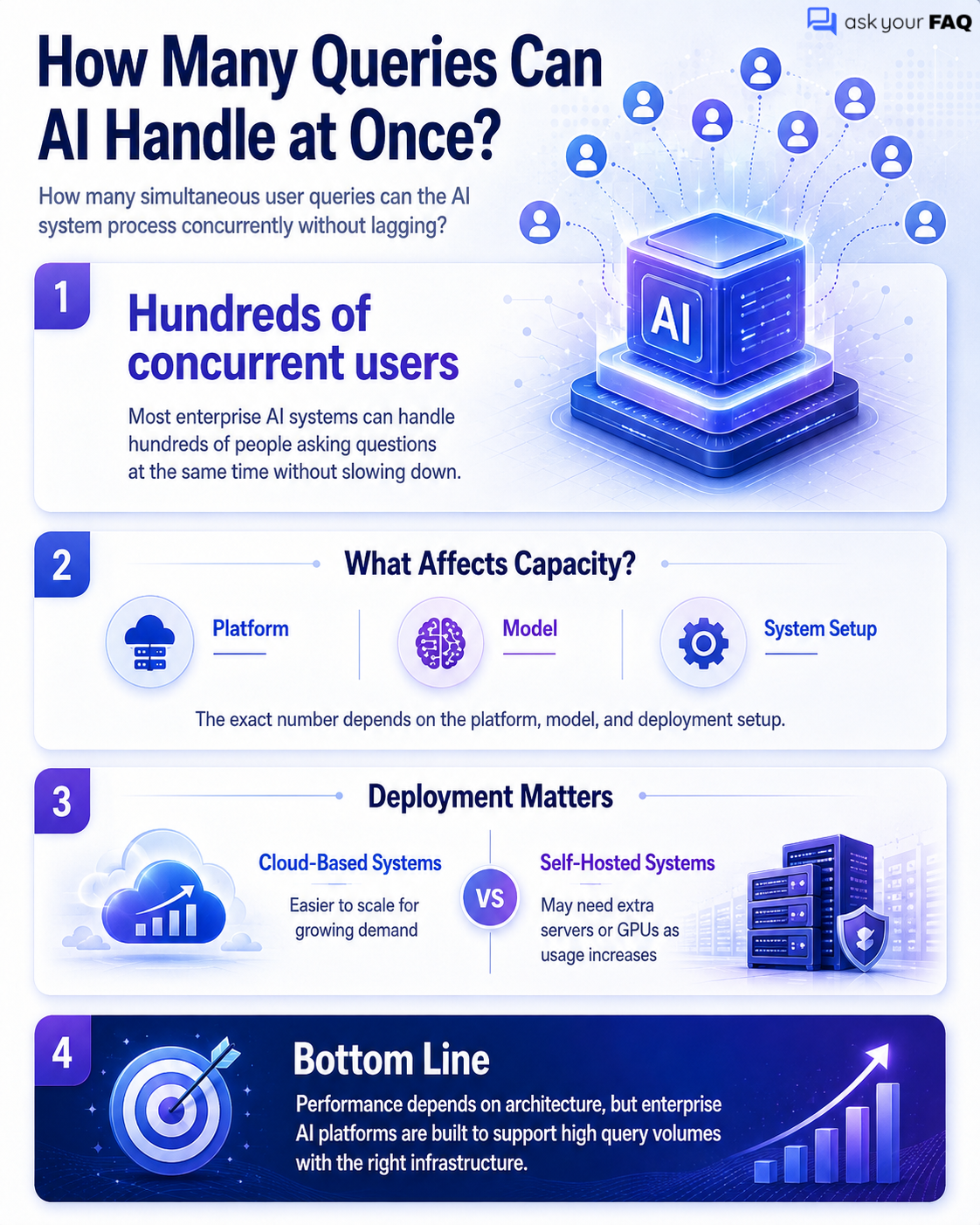
18. How many simultaneous user queries can the AI system process concurrently without lagging?
Most enterprise AI systems can handle hundreds of people asking questions at the same time without slowing down. The exact number depends on the platform, model, and setup. Cloud-based systems are usually easier to scale, while self-hosted systems may need additional servers or GPUs as demand increases.
19. How many languages can the platform accurately translate and answer questions in natively?
Most enterprise AI platforms can understand and respond in 50 to 100 languages without extra setup. They usually perform best in widely spoken languages such as English, Spanish, French, German, Chinese, and Japanese. Accuracy may vary for less common languages or regional dialects, so it is best to test them with your own content before launch.
Accuracy, Maintenance & Fallbacks
20. Why do some AI knowledge bases hallucinate even when restricted to a closed RAG system?
Even in a closed RAG system, AI can still give incorrect answers if it pulls the wrong document, misses part of the context, or finds conflicting information. It may also try to fill in gaps when the answer is not clearly available. Keeping content accurate, improving how documents are split and searched, and requiring source-based answers can help reduce hallucinations.
21. How does the AI handle conflicting information found in two different internal documents?
When the AI finds conflicting information, it should avoid guessing. It can use the newest or most trusted document, show both answers with their sources, or send the issue for human review. Clear dates, version numbers, and document ownership make it easier for the AI to choose the right information.
22. When does the system automatically flag an article as “stale” or in need of human review?
The system flags an article when it has not been reviewed for a long time, gets repeated negative feedback, or no longer matches current policies or product updates. The article is then sent to its owner for review instead of being changed or deleted automatically.
23. What is the exact fallback behavior of the AI when it encounters a completely blank search result?
If the AI cannot find any matching information, it should clearly say so instead of making up an answer. It may broaden the search, suggest related topics, or direct the user to a human expert. The failed search should also be logged so the missing information can be added later.
24. How can we override an incorrect AI response instantly if a critical product bug or crisis occurs?
During a critical bug or crisis, an administrator should be able to replace the AI’s normal answer with an approved emergency message right away. This temporary response can warn users, share the correct action, or direct them to support. Once the issue is fixed, update the main documentation and remove the emergency override.
25. Where do administrative managers go to approve, reject, or edit automated content drafts?
Managers usually review AI-generated drafts in the platform’s admin dashboard. They can open the approval queue, check the suggested changes, make edits, and then approve or reject the draft. Some platforms also allow managers to handle approvals directly through Slack, Microsoft Teams, or a support ticket system.
User Experience & Operations
26. Which user interface style yields higher engagement: a conversational chatbot or an AI-powered search bar?
An AI-powered search bar usually works better for employees because it helps them find information quickly. A chatbot is often better for customers who may need guidance or follow-up questions. In many cases, the best experience combines both: quick search results first, with the option to continue in chat.
27. Where should companies embed the AI knowledge base in the customer journey to maximize deflection?
Place the AI knowledge base where customers are most likely to run into problems, especially before they submit a support ticket. Good locations include the ticket form, live chat, billing pages, setup screens, and the help center. This helps customers find answers on their own before they contact a support agent.
28. Why do customer satisfaction (CSAT) scores sometimes drop immediately after deploying an AI agent?
Customers may give lower CSAT scores at first when repeated answers frustrate them, they cannot easily reach a human, or they must explain the same problem again after a transfer. Clear AI messaging, faster human handoffs, and sharing the full conversation with support agents usually help improve satisfaction.
29. How does the system format answers cleanly for multiple channels like Slack, web widgets, and email?
The system creates one clear answer and then adjusts it for each channel. Slack gets short messages, bullets, and simple links. Web widgets can show richer layouts, tables, and clickable sources. Emails use a clean, mobile-friendly format, with a plain-text version as a backup.
30. When a user asks an emotional or frustrated question, when does the AI hand off to a human agent?
The AI should transfer the conversation to a human when the user asks to speak with someone, becomes clearly frustrated, gives repeated negative feedback, or mentions a serious legal or safety concern. The human agent should receive the full chat history and a summary so the user does not have to repeat the issue.
31. When we update a source document, how long does it take for the AI to learn the new information?
With real-time syncing, updated information can appear in the AI within 30 to 60 seconds. If the system checks for changes on a schedule, it may take a few hours. Older or more complex systems can take up to 24 hours to reflect the update.
32. Which analytics reports are most useful for identifying critical gaps in our documentation?
The most useful reports show searches with no results, articles receiving negative feedback, conversations that still lead to support tickets, and topics that are suddenly becoming popular. These reports help you see what information is missing, outdated, unclear, or urgently needed so your team knows what to improve first.
Choose The Best AI Knowledge Base That Fits Your Enterprise
The best AI knowledge base should make enterprise document search faster, more accurate, and easier to manage. Focus on secure integrations, reliable source citations, permission controls, fast syncing, and strong retrieval quality. Avoid choosing a platform based only on advanced features or model names. The right solution works with your existing content, meets compliance needs, scales with document growth, and helps employees find trusted answers without wasting time searching across disconnected systems.