

If you’re answering the same customer questions every day, you know how quickly routine requests fill your support queue. Customers wait for answers about returns, delivery, or payments, while your team has less time for problems that need personal attention.
A practical starting point for customer support automation is making clear, approved answers easy to find. Let customers search your FAQs in their own words, explain exceptions, and keep human support accessible when a standard answer isn’t enough.
This blog explains how to automate repetitive questions without frustrating customers.
You’ll learn which questions to automate, how to make answers searchable, and when to involve a person.
Key Takeaways
- Automate frequent questions with clear answers and manageable exceptions.
- Use approved FAQ content as the foundation for automated responses.
- Help customers find answers using their own wording.
- Provide human assistance when an answer is missing or insufficient.
- Measure problem resolution, repeat contacts, and unanswered searches.
What Is Customer Support Automation?
Customer support automation uses software to answer common questions and handle repetitive support tasks, such as routing requests or sending confirmations.
For FAQ support, intent-based search helps customers find relevant answers even when their wording differs from your FAQs. Questions involving exceptions, sensitive information, or unresolved problems should have a clear route to human support.
Which Repetitive Questions Should You Automate?
Start with frequent questions, have dependable answers, and rarely require individual judgment. Review recent tickets, emails, and website searches to identify them.
These customer support automation examples show how to define useful boundaries:
| Repetitive question | Suitable automated answer | Escalation trigger |
| What are your opening hours? | Current hours by location | Conflicting holiday information |
| How do I reset my password? | Instructions linking to secure password recovery | Recovery fails or the account appears compromised |
| What is your return policy? | Eligibility, deadlines, and return steps | Damaged goods or a disputed exception |
| Where can I find my invoice? | Navigation to the account’s billing section | Missing or incorrect charges |
| Does this work with my device? | Verified compatibility details | An unlisted configuration |
Distinguish between explaining a process and performing it. An FAQ can explain how to request a refund. Approving or issuing one requires appropriate permissions and access to transaction information.
Before automating, ask whether you can remove the underlying confusion. If customers repeatedly ask where to download an invoice, improving the account navigation could prevent the question altogether.
How to Automate Customer Service Without Frustrating Customers
Use an Answer, Find, Fallback framework: approve the information, make it discoverable, and provide a next step when it does not resolve the issue.
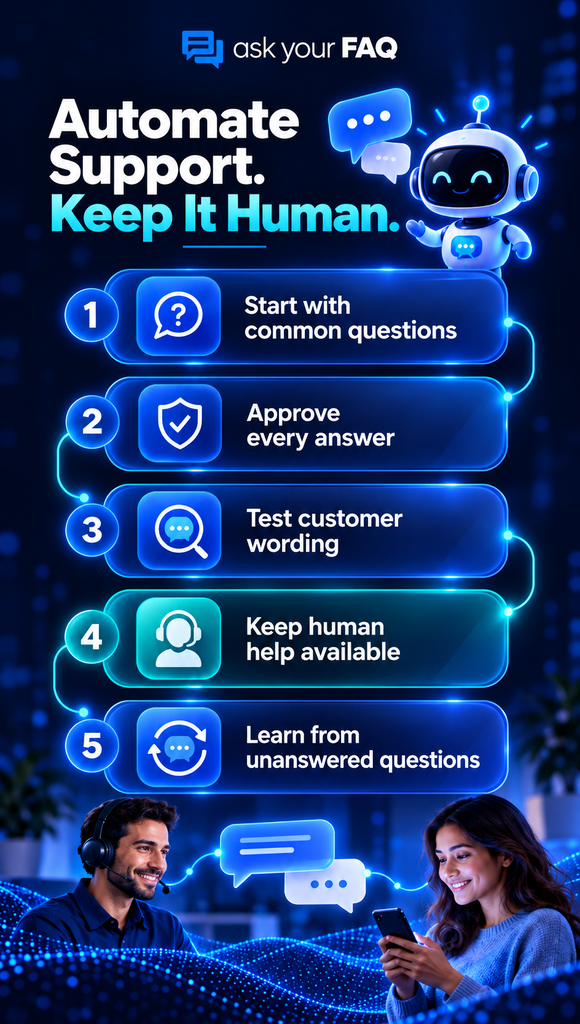
1. Group questions by what customers need
Collect examples from your support channels and group them by intent.
“Where’s my receipt?” and “Can I download proof of payment?” could belong to one topic. “Why was I charged twice?” needs a separate response and investigation.
Choose a small starting set your team can maintain. Record frequency, common exceptions, and the consequences of giving an incorrect answer.
Remove personal information from messages before adding them to shared planning or testing documents.
2. Answer: Create a clear, approved response
Write the direct answer first, followed by instructions and relevant conditions.
For example, “You can download invoices from Account → Billing → Invoices” is more useful than “Please check your account.”
Each FAQ should include:
- The answer or action the customer needs.
- Conditions that change the answer.
- Accurate links or interface labels.
- A next step if the instructions fail.
Assign a content owner and record the last verification date internally. Resolve conflicting policy documents before making their content available through automation.
3. Find: Test everyday wording
Customers should not need your internal terminology to get help.
Test “change my card,” “update payment method,” and “replace billing card” against the same underlying task. Also test nearby questions that require different answers, such as changing a billing address.
The distinction between AI search and full-text search helps explain why wording matters. Intent-based search aims to connect different expressions with relevant information, but its usefulness still depends on content quality and testing.
4. Fallback: Make further help accessible
Decide what customers should do when an answer is missing, unclear, or unsuccessful.
Use specific wording: “If the reset email has not arrived after these checks, contact support.” Show the contact method and expected availability.
Where your systems support it, pass the original question and attempted steps to the employee. Otherwise, let customers include that information easily.
A visible contact option should remain available throughout the experience.
5. Test complete tasks before expanding
Ask someone unfamiliar with your FAQ to complete a realistic task. Observe whether they find the answer, understand it, and know what to do next.
Include misspellings, incomplete questions, exceptions, and mobile use. Check keyboard navigation and whether contact options are easy to locate.
Digital.gov’s guidance on improving customer experience with chatbots emphasizes usability testing and maintaining the content behind automated assistance.
Launch one category first. Fix problems before adding more topics.
Do You Need FAQ Search or a Chatbot?
Choose FAQ search when customers mainly need information. Consider a customer service chatbot when the interaction requires clarification, several conversational steps, or connections to other systems.
| Customer task | Approach to evaluate |
| Find a policy or product answer | Searchable FAQ |
| Follow a straightforward procedure | Knowledge base article |
| Diagnose a problem with several possible causes | Guided troubleshooting or a chatbot |
| Retrieve personal order information | Authenticated tool connected to order data |
| Send an issue to the correct department | Help desk routing rules |
Customer self-service can combine these approaches. A customer could find instructions through search and then contact an employee when the instructions do not work.
When evaluating customer service automation tools, ask vendors to demonstrate your real questions. Check content approval controls, unanswered-query reporting, accessibility, and maintenance effort.
For more guidance, explore these AI tool selection and implementation tips. Check whether each option fits your support needs, budget, and setup requirements.
What Does Helpful Automation Look Like in Practice?
Consider a fictional retailer that receives repeated questions about returning discounted products. The following policy is illustrative.
Customer question: “Can I return something I bought on sale?”
Approved answer: “Discounted items can be returned within 30 days if unused and in their original packaging. Products marked ‘final sale’ are excluded. Start your return from your order history.”
That response answers the main question, explains an exception, and gives the next action.
Now apply the framework:
- Answer: The policy owner checks that the wording matches the current return policy.
- Find: Test phrases such as “return a discounted item” and “refund on sale purchases.”
- Fallback: Direct customers with damaged items, rejected requests, or unclear eligibility to support.
Keep the route to a person simple. The guidance on providing human help recommends avoiding complex menus and lengthy forms that make assistance harder to access.
A second customer asks, “My sale item arrived broken. Can I send it back?” Repeating the general return policy is insufficient. The customer needs damage-reporting instructions or individual assistance.
Also distinguish general information from personal records. A public FAQ cannot confirm whether a particular order qualifies without access to the relevant details.
The experience should make those limits clear without leaving the customer stranded.
How Do You Measure and Improve Results?
Measure whether customers resolve their problems and how much effort they spend getting there.
Track these signals during your pilot:
| Signal | What it helps you understand |
| Customer-confirmed resolution | Whether the answer solved the issue |
| Unanswered searches | Missing content or retrieval problems |
| Repeat contact about the same issue | Whether the initial help was sufficient |
| Negative answer feedback | Confusing, incomplete, or incorrect responses |
| Time to useful help | How easily customers reach an actionable answer |
A session ending without a support ticket does not prove success. The customer could have resolved the issue, abandoned the task, or switched channels.
Review a sample of interactions alongside the numbers. Compare similar topics before and after launch, accounting for changes in traffic or product availability.
Classify failures before fixing them: missing answer, incorrect answer, poor match, unclear instructions, or unavailable next step. Each requires a different response.
If navigation is the obstacle, apply relevant FAQ page design improvements, such as clearer categories, readable layouts, and visible contact options.
Frequently Asked Questions
Who should own automated FAQ content?
Assign each topic to someone responsible for the underlying policy or process. A support or knowledge manager can coordinate reviews, while product, billing, or operations specialists verify answers within their areas of responsibility.
What should happen when customers ask an unanswered question?
Provide a clear contact option and capture the knowledge gap for review. Check whether the question is recurring, confirm the correct response, and publish an approved answer when it is suitable for general self-service.
How do you prevent conflicting automated answers?
Maintain one approved source for each topic and retire outdated versions. When a policy changes, update every customer-facing location that uses it. Test related questions afterward to identify contradictions or obsolete instructions.
Can a small business automate support without a chatbot?
Yes. A searchable FAQ, useful help articles, automated acknowledgments, and simple routing rules can cover routine needs. Start with the most common customer questions and add more capabilities when a specific task requires them.
How often should you review automated answers?
Review answers when policies, products, or procedures change. During a pilot, inspect unanswered searches and negative feedback frequently. Set recurring reviews according to how quickly each topic changes and how consequential an incorrect answer would be.
Build a More Useful First Layer of Support
Effective customer support automation starts with clear answers, easy search, and accessible human help. Automating routine questions can give customers a faster path to information while freeing your team to handle issues that need personal attention.
Start with ten recurring questions. Approve each answer, test different customer phrasings, and make the next step clear when self-service falls short.
Review unanswered questions and customer feedback regularly. If the same confusion keeps appearing, improve the relevant FAQ, policy, or website page. Expand gradually, using what customers actually need to guide your next step.