
An AI knowledge base helps businesses turn scattered information into accurate, searchable answers. Instead of making users dig through documents, FAQs, tickets, or internal tools, it retrieves the right information for users, and delivers it in a clear response.
This FAQ blog explains what an AI knowledge base is, how it works, when to use one, what to include, and how to keep it accurate over time. Use it to understand the basics, compare tools, and build a knowledge base that supports customers, employees, and AI agents.
Key Takeaways
- An AI knowledge base is a trusted source of information that helps AI deliver accurate, business-specific answers instead of guessing.
- It works by collecting content from FAQs, help docs, PDFs, tickets, and internal files, then retrieving the most relevant information using semantic search or RAG.
- AI knowledge bases improve customer support by reducing repetitive tickets, speeding up answers, and helping agents resolve complex issues faster.
- The best knowledge bases are built from clean, structured, frequently asked questions such as FAQs, SOPs, policies, product docs, and troubleshooting guides.
- Accuracy depends on regular updates, clear source rules, feedback tracking, and the removal of outdated, duplicate, or conflicting information.
Try Ask Your FAQ
Definition and basic understanding
1. What is an AI knowledge base?
An AI knowledge base is like a trusted information hub for your AI. It stores things like FAQs, product details, help articles, company policies, and troubleshooting steps. When someone asks a question, the AI uses this approved information instead of guessing, so it can give answers that are more accurate, helpful, and relevant to your business.
2. How is an AI knowledge base different from a traditional knowledge base?
A traditional knowledge base is mainly built for people to search and browse. It usually contains help articles, FAQs, and documents, but users often need to know the right keywords to find what they’re looking for.
An AI knowledge base works a bit differently. Instead of just showing a list of articles or links, it tries to understand what the person is really asking and gives a direct answer. It can pull information from sources like docs, tickets, chats, and FAQs to make the response more useful and relevant.
In simple terms, a traditional knowledge base helps people find information, while an AI knowledge base helps them get answers.
3. Does ChatGPT have a knowledge base?
Yes, ChatGPT can use different types of knowledge depending on how it’s set up. For example, you can upload files to a Custom GPT so it can answer from your own documents, guides, or internal content. Some business plans also let ChatGPT connect with company tools and documents to provide organization-specific answers. ChatGPT can also use Memory to remember helpful details you’ve shared, such as preferences or ongoing context.
Business value and use cases
4. Why is an AI knowledge base necessary for an organization?
It keeps important company information in one trusted place. It helps employees and AI systems find accurate answers in documents, policies, PDFs, and support content.
It also reduces repeated questions, improves customer support, prevents outdated information from spreading, and preserves company knowledge as teams grow or change.
5. When should a business use an AI knowledge base?
A business should use an AI knowledge base when information is hard to manage or the same questions keep coming up.
It is useful when support teams handle repeated queries, onboarding takes too long, or company knowledge is scattered across tools like Google Drive, Slack, Jira, or a CRM. It helps employees and customers find reliable answers faster, without waiting for someone to respond.
6. What problems does an AI knowledge base solve?
It solves the problem of scattered, hard-to-find information. It brings content from tools like Slack, Google Drive, Zendesk, Confluence, PDFs, and internal docs into one searchable place.
It also reduces repetitive support questions, helps new employees find answers faster, preserves company knowledge when people leave, and improves search by understanding natural language instead of only exact keywords.
7. Can an AI knowledge base improve customer support?
Yes. An AI knowledge base helps customers get instant answers to common questions, even outside business hours.
It reduces repetitive tickets, gives agents quick access to troubleshooting steps, policies, and product details, and helps managers find gaps in the help center. This lets customers solve simple issues faster while agents focus on complex problems.
Planning and getting started
8. What should an AI knowledge base include?
It should include FAQs, help articles, product documentation, troubleshooting guides, SOPs, company policies, onboarding materials, and past support conversations.
It should also have clear titles, tags, categories, source links, access permissions, feedback options, and regular review processes to keep the content accurate and useful.
9. What information should you add first to an AI knowledge base?
Start with the information people ask for most often. This usually includes FAQs, top support tickets, common onboarding questions, SOPs, product or service details, and verified company policies.
Use clean, easy-to-read content first, such as Q&A pairs, bullet-point guides, and step-by-step instructions. This helps the AI give accurate answers before you add more complex or messy documents.
10. How large does a knowledge base need to be before AI can use it effectively?
AnIt does not need to be huge to work well. Even 10 to 20 clear, well-written documents can be enough if they answer common questions and are kept up to date.
What matters most is the quality of the content, not the size. A small set of accurate FAQs, policies, troubleshooting guides, or product documents will usually perform better than hundreds of outdated or messy files. Start small, test the answers, and expand the knowledge base as new questions come in.
11. Can AI use FAQs, help docs, PDFs, support tickets, and product documentation together?
Yes. An AI knowledge base can use FAQs, help docs, PDFs, product documentation, and support tickets together.
It converts them into a searchable format, retrieves the most relevant information, and uses it to answer questions. The main risk is conflicting or outdated content, so sources should be kept updated and prioritized clearly.
12. Can the knowledge base be customized to match a brand?
Yes. An AI knowledge base can be customized to match your brand’s look, voice, and rules.
You can adjust the design with your logo, colors, fonts, and custom domain. You can also set the AI’s tone, approved vocabulary, greetings, and response style. For better control, you can add rules for what the AI should or should not say, such as avoiding sensitive topics, unauthorized discounts, or off-brand language.
Building an AI knowledge base
13. How do you build an AI knowledge base?
To build an AI knowledge base, start by defining who it is for and what questions it should answer. Then collect your existing FAQs, help articles, SOPs, product docs, PDFs, and support content.
Next, clean the content by removing outdated, duplicate, or confusing information. Choose a tool or platform, upload or connect your data sources, and set rules for how the AI should respond. Finally, test it with real questions, fix gaps, and keep improving it as new queries come in.
14. What are the four steps to building an AI knowledge base?
The four main steps are: Clean your data, Structure your knowledge, Set AI rules, and Keep improving it.
First, collect your FAQs, help docs, PDFs, policies, and support tickets. Remove outdated, duplicate, or unclear content. Next, organize the information into clean sections so the AI can find the right answers easily.
Then, set rules for tone, accuracy, source use, and human escalation. Finally, test the AI with real questions, review failed answers, and update the knowledge base regularly.
15. How should content be structured for an AI knowledge base?
Content should be clear, specific, and easy for AI to read. Use short sections, simple headings, bullet points, and step-by-step instructions.
Each page should focus on one topic, and each answer should make sense on its own. Avoid vague phrases like “click here” or “update it.” Instead, say exactly what the user should do, such as “click the Update Billing button.”
For best results, use question-based headings, clean Q&A formats, source details, tags, and last-updated dates. Avoid large tables, image-only instructions, and long documents that mix too many topics.
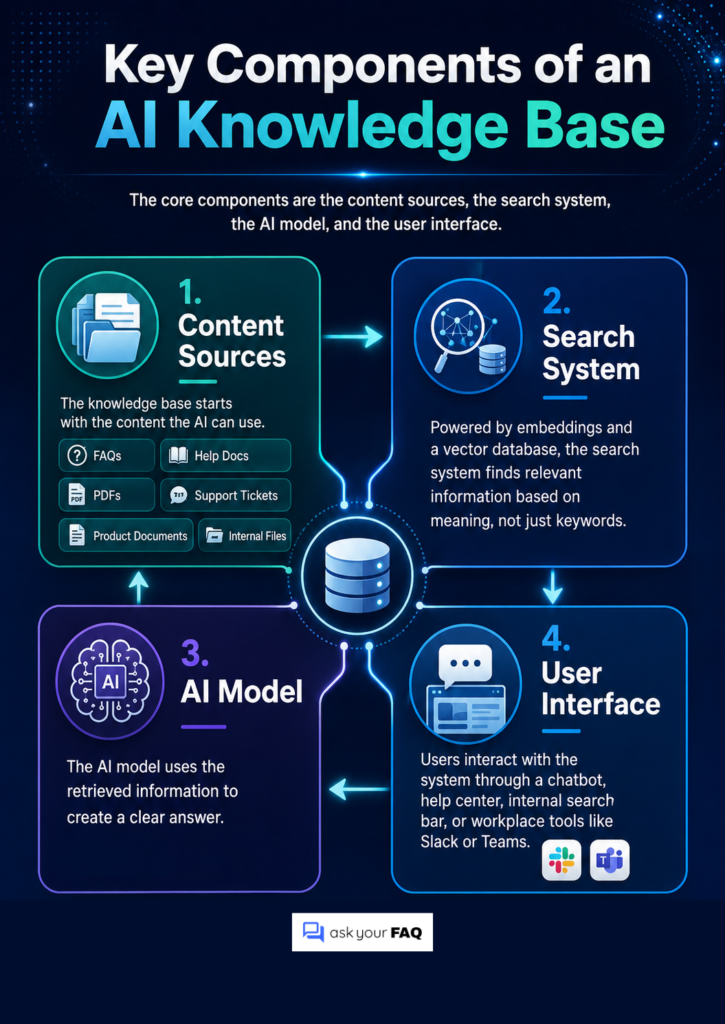
16. What are the key components of an AI knowledge base?
The key components of an AI knowledge base are the content sources, the search system, the AI model, and the user interface.
Content sources include FAQs, help docs, PDFs, support tickets, product documents, and internal files. The search system, often powered by embeddings and a vector database, helps the AI find relevant information based on meaning, not just keywords. The AI model then uses that information to create a clear answer.
Finally, users interact with the system through a chatbot, help center, internal search bar, or workplace tool like Slack or Teams.
How it works technically
17. How does an AI knowledge base work?
An AI knowledge base collects content from sources like help docs, PDFs, support tickets, and internal files. It breaks that content into smaller sections, turns them into searchable data, and stores them for retrieval.
When someone asks a question, the AI searches by meaning, finds the most relevant information, and uses it to generate an answer based on the source content. This is often done using RAG, or retrieval-augmented generation.
18. What is RAG in an AI knowledge base?
RAG stands for Retrieval-Augmented Generation. It helps an AI knowledge base find relevant information from your company documents before generating an answer.
When someone asks a question, the system first retrieves the most useful content from sources like PDFs, help docs, or internal files. Then the AI uses that content to write a clear answer. This helps reduce made-up responses because the AI is grounded in your actual knowledge base instead of relying only on its general training.
19. Why use a vector database for an AI knowledge base?
A vector database helps AI search by meaning instead of exact keywords. It can match “I forgot my login” with “reset password” because both have a similar intent.
It stores content as embeddings, finds the closest matching information, and sends that content to the AI to generate a relevant answer.
20. Why is a vector database like Qdrant useful when building an AI knowledge repository?
A vector database like Qdrant helps an AI knowledge repository search large amounts of content quickly and accurately. It stores information as embeddings, so the AI can find answers based on meaning, not just exact keywords.
Qdrant is useful because it also supports metadata filtering. For example, it can search only HR documents, product docs, or content that a specific user is allowed to access. This helps keep results relevant and reduces the risk of showing sensitive or incorrect information.
21. How do embeddings help AI perform semantic search?
Embeddings turn text into numerical representations of meaning. This helps AI understand that phrases like “I forgot my login” and “How do I reset my password?” are related, even if they use different words.
When someone asks a question, the system compares that question with stored content and finds the closest match based on meaning. This makes the search more flexible and accurate than simple keyword matching.
22. How do AI agents retrieve answers from a knowledge base?
AI agents usually use Retrieval-Augmented Generation. When someone asks a question, the agent searches the knowledge base for the most relevant content based on meaning, not just exact keywords.
It then pulls the best-matching sections from docs, FAQs, or support tickets and uses them to create an answer. Some systems also show source links so users can verify the information.
Accuracy, reliability, and improvement
23. Why do AI support bots sometimes give vague or inaccurate answers?
AI support bots usually give poor answers when they cannot find the right information, or when the knowledge base contains outdated, conflicting, or unclear content.
For example, if the AI pulls an old refund policy, misses key details in a PDF, or finds no relevant source at all, it may give a vague answer or make a wrong guess. This is why clean documentation, good search setup, clear source rules, and human escalation are important.
24. How do you make an AI knowledge base more accurate?
To make an AI knowledge base more accurate, start with clean and updated content. Remove duplicate, outdated, or conflicting documents so the AI is not pulling from the wrong source.
Then structure the content clearly with headings, short sections, tags, and source details. Use a strong search setup, such as semantic search, keyword search, and filters, so the AI can retrieve the right information.
Finally, add guardrails that tell the AI not to guess when the answer is missing, and review failed or downvoted answers regularly to fix gaps.
25. How do you identify gaps in an AI knowledge base?
You can identify gaps by tracking the questions your AI cannot answer well. Look at failed searches, low-confidence answers, downvoted responses, and cases where users quickly ask for a human agent.
Group these failed questions by topic to see what is missing most often. For example, if many users ask about billing errors and the AI struggles, you may need a clearer billing article. Reviewing support tickets and common human-agent replies can also show which answers should be added to the knowledge base.
26. How can failed AI responses improve a knowledge base?
Failed AI responses show where your knowledge base is weak. If the AI says it does not know, gives the wrong answer, or sends users to a human agent, that usually means something is missing, outdated, unclear, or hard to retrieve.
You can use these failures to create new articles, add better keywords or synonyms, clean up confusing documents, and improve escalation rules. In short, every failed answer helps you decide what to fix next.
27. How can you ensure your knowledge base remains effective over time?
Keep your AI knowledge base updated, tested, and reviewed regularly. Sync it with live sources where possible, remove outdated content, and set review dates for important documents.
Track failed answers, low-confidence responses, user downvotes, and questions that get escalated to humans. These signals show what needs to be fixed or added. It also helps to assign content owners, so each team is responsible for keeping its own policies, product docs, or support content accurate.
28. How often should an AI knowledge base be updated?
An AI knowledge base should be updated whenever important information changes. If possible, connect it to live sources like Notion, SharePoint, Zendesk, or Google Drive so new edits sync automatically.
You should also review performance regularly. Check failed answers and user downvotes weekly, clean up outdated or duplicate content monthly, and run a deeper audit every quarter to make sure the AI is still giving accurate answers.
29. How do you measure the success of an AI knowledge base?
You measure success by checking whether the AI is helping users find accurate answers faster.
Track metrics like ticket deflection rate, resolution time, escalation rate, user feedback, and how often the AI says it does not know. You should also monitor answer accuracy, source relevance, and failed searches.
Together, these show whether the knowledge base is reducing support workload, improving user experience, and staying reliable over time.
Building a Smarter AI Knowledge Base
An AI knowledge base helps businesses turn scattered information into clear, reliable answers. It gives AI agents, employees, and customers a trusted source to pull from, whether the content lives in FAQs, help docs, PDFs, support tickets, or internal systems.
The key is not to build a huge knowledge base from day one. Start with your most useful and frequently requested content, keep it clean and structured, and improve it based on failed searches, user feedback, and support gaps.
When maintained well, an AI knowledge base can reduce repetitive questions, improve customer support, speed up internal search, and help teams make better use of the knowledge they already have.