
When people search for Amazon-related questions, they usually want fast answers with no extra digging. Most queries are practical, action-based, and tied to immediate needs such as tracking orders, managing returns, understanding seller rules, or using Amazon features correctly. Amazon FAQ content works best when answers are direct, structured, and easy to apply without extra interpretation.
Because Amazon covers shopping, payments, delivery, reviews, selling, and account management, users expect answers that solve one clear problem at a time. Whether someone is changing an order address, finding a storefront, or understanding Amazon Vine, the value comes from short, accurate guidance that removes confusion quickly.
Summary
- Direct answers to common Amazon questions across orders, payments, reviews, shipping, and selling
- Clear, action-focused explanations built for quick understanding and immediate use
- Covers customer tasks, seller processes, Amazon programs, and account-related actions
- Structured for easy scanning, making information faster to find and apply
Amazon Jobs, Earnings, and Employment
Questions related to Amazon worker pay, delivery jobs, warehouse roles, and employment opportunities:
1. How much do Amazon drivers make?
Amazon delivery drivers usually earn $18 to $25 per hour, with an average of about $20.49 per hour. Full-time annual pay typically ranges from $33,500 to $42,000. Amazon DSP drivers are paid hourly by delivery partners, while Amazon Flex drivers, who use their own vehicles, earn similar rates and typically make $72 to $108 for a 4-hour block.
Pay varies by location, with higher wages in cities like Denver and Los Angeles, where rates can exceed $26 per hour. Larger vehicle drivers, such as step van operators, may earn more.
2. How much do Amazon Flex drivers make?
Amazon Flex drivers typically earn $18 to $25 per hour, with average hourly earnings around $21. Pay depends on location, delivery demand, tips, and block availability. In some areas, a 4-hour block can pay about $114. Since Flex drivers use their own vehicles, expenses like gas, maintenance, and insurance reduce net earnings. Deliveries such as Amazon Fresh and Prime Now may include tips, which can increase total income.
3. How much do Amazon workers make?
Amazon warehouse workers in the U.S. earn an average of over $22 per hour, with total compensation exceeding $29 per hour when benefits are included. Starting pay usually ranges from $17 to $23 per hour, depending on role and location. Common warehouse roles such as fulfillment associates and packers generally fall within this range, while delivery drivers and Amazon Flex drivers often earn $18 to $25 per hour.
Amazon also provides benefits like health insurance, 401(k) matching, paid parental leave, and education assistance.
4. Do Amazon drivers know what they are delivering?
No, Amazon delivery drivers usually do not know exactly what is inside your packages. Most items are shipped in plain packaging that hides the contents. In some cases, drivers may guess the item based on the package size, shape, weight, visible manufacturer box, or required hazard labels.
Specialized deliveries like Amazon Fresh or oversized Amazon XL items may make contents more obvious, but standard drivers generally only see shipping details, not a product list.
Amazon Reviews, Reviewers, and Product Testing
Questions about becoming reviewers, managing reviews, and testing products:
5. How to get paid for Amazon reviews?
Amazon does not pay customers directly to write reviews. Paid reviews arranged with sellers violate Amazon policy and can result in account suspension.
Legitimate ways to earn through Amazon review-related content include:
- Amazon Influencer Program: Earn commissions by creating shoppable review videos.
- Amazon Vine: An invitation-only program where selected reviewers receive free products for honest feedback.
- Amazon Associates: Bloggers and website owners earn affiliate commissions through product review links.
Third-party paid review schemes are not allowed and often lead to penalties on Amazon accounts.
6. How to become an Amazon reviewer?
To become an Amazon reviewer, use your Amazon account to publish reviews on products you have actually used. Eligibility requires at least $50 spent on Amazon in the last 12 months through a valid payment method. Reviews that are specific, consistent, and useful to shoppers help build visibility.
Strong reviewer activity may lead to an invitation to Amazon Vine, where selected members receive products for review. Those with a social audience or content platform can also apply for the Amazon Influencer or Associates programs to earn commissions from review-driven referrals.
7. Can you buy Amazon reviews?
No, buying Amazon reviews is against Amazon policy and can lead to seller account suspension or permanent bans. Amazon and the FTC actively penalize fake review schemes, including fines and legal action.
Approved alternatives include:
- Amazon Vine: Amazon’s official program for obtaining honest reviews through enrolled products.
- Request a Review tool: Sends compliant review requests to verified buyers through Seller Central.
Paying third-party brokers, review groups, or fake reviewers is considered review manipulation and carries high risk.
8. How to become an Amazon Vine reviewer?
To become an Amazon Vine reviewer, you must be invited by Amazon. There is no public application process. Invitations are typically sent to customers who consistently write detailed, useful, and credible product reviews.
To improve your chances:
- Write clear, specific reviews based on actual product use
- Focus on verified purchases whenever possible
- Add balanced pros and cons instead of generic praise
- Include photos or videos when relevant
- Build a steady history of high-quality reviews over time
Amazon selects Vine reviewers based on review quality and helpfulness, not on payment or sign-up requests.
9. How to become an Amazon product tester?
Amazon does not offer a formal paid job called “product tester.” Product testing usually means receiving free items in exchange for honest feedback, not earning a salary.
Main legitimate options include:
- Amazon Vine: An invitation-only program where selected reviewers receive free products to review.
- Amazon Influencer Program: Creators earn commissions by making review videos for Amazon products.
- Third-party testing platforms: Some external communities send products from brands that sell on Amazon.
Amazon does not charge fees to join these programs, and any offer promising cash payments for reviews should be treated with caution.
10. How to see my Amazon reviews?
To see your Amazon reviews, go to your Amazon profile page, where all submitted reviews are listed under your community activity.
- On desktop: Open Account & Lists > Your Account > Your Amazon Profile
- On mobile app: Tap the profile icon, then scroll to Your Reviews and select See All
From the same page, you can also edit or delete reviews and view your reviewer rank if available.
11. How to delete an Amazon review?
To delete an Amazon review, open your Amazon profile and locate the review under community activity.
- Desktop: Go to your Amazon Profile, find the review, click the three-dot menu, and select Delete review.
- Mobile app: Open your profile, go to Your Reviews, tap the three-dot menu next to the review, then choose Delete.
Deleted reviews cannot be restored, so use edit instead if you only want to update the content.
12. How to scrape Amazon reviews?
Amazon reviews can be scraped using tools, APIs, or scripts, but this violates Amazon’s terms. Amazon actively blocks scraping through CAPTCHA and anti-bot systems, and linked accounts may face restrictions. Limit collection to public data only, avoid deceptive use, and use official Amazon APIs where available for compliant access.
Amazon Orders, Shipping, Returns, and Refunds
Questions involving shipping times, order management, delivery issues, cancellations, and refunds:
13. How long does Amazon take to ship?
Amazon shipping can take anywhere from same day to 8 business days, depending on membership, location, and item availability. Prime orders often arrive the same day, next day, or within 2 days, while non-Prime standard shipping usually takes 5 to 8 business days. Delivery speed may vary based on warehouse location, seller handling time, and regional demand.
14. How to change the address on an Amazon order?
To change the address on an Amazon order, go to Your Orders, open the order details, and select Change next to the shipping address if the item has not shipped yet. If the order is already in shipping or marked as shipped, the address usually cannot be changed through Amazon. In that case, you may need to contact the carrier or cancel and reorder if eligible.
15. How to cancel an Amazon return?
To cancel an Amazon return, open Returns & Orders, select the item, go to View return/refund status, then choose Manage return and click Cancel return. This option is available only if the item has not been shipped back yet. If you have already generated a return label but do not use it, the return request usually expires automatically.
16. How to get an Amazon refund without returning the item?
To get an Amazon refund without returning the item, start a normal return request through Your Orders. If eligible, Amazon may automatically issue a refund and state that no return is needed. This usually applies to low-cost, damaged, bulky, or non-resellable items. If no option appears, contact customer service and explain why returning the item is not practical.
17. How to report an Amazon package stolen?
If an Amazon package is marked delivered but missing, wait 48 hours first, as scans can update early. Then check nearby areas and with neighbors. If still missing, go to Your Orders, select the item, choose Problem with order, and report it as not received. For third-party sellers, contact the seller first before filing an A-to-Z Guarantee claim if needed.
18. When will Amazon charge my card?
Amazon usually charges your card when the item ships, not when the order is placed. For physical products, you may see a temporary authorization hold before shipment. Digital purchases, subscriptions, gift cards, and some third-party seller orders are often charged immediately. If an order ships in multiple packages, charges may appear separately for each shipment.
Amazon Delivery Driver Interaction
Questions specifically related to customer interaction with delivery drivers:
19. How to thank an Amazon driver?
You can thank an Amazon driver by using the official “Thank My Driver” feature through Alexa or by typing it in the Amazon app search bar. This sends recognition directly to the driver. You can also leave positive delivery feedback on your order tracking page or place snacks and drinks outside for drivers during deliveries.
20. How to tip an Amazon driver?
You can tip Amazon drivers only for grocery deliveries such as Amazon Fresh and Whole Foods orders, where tipping is added during checkout and can be changed within 24 hours after delivery. Standard Amazon package drivers do not have an in-app tipping option. For regular deliveries, appreciation is usually shown through the “Thank My Driver” feature, cash tips, or snacks left at the door.
Amazon Shopping and Product Purchase Queries
General consumer shopping-related questions:
21. What is the most expensive thing on Amazon?
The most expensive item on Amazon is often a rare art or collectible listing. One of the highest-priced examples is “The Way” by Gafur Timeryanov, listed at about $32 million. Other costly items include rare signed sports memorabilia worth over $1 million, luxury watches such as Rolex and Patek Philippe priced in the hundreds of thousands, and high-end prefab homes above $90,000.
22. Can you buy alcohol on Amazon?
Yes, you can buy alcohol on Amazon, but only through specific services and in eligible locations.
- Where available: Amazon Fresh, Whole Foods delivery, and Prime Now (in select cities)
- Not allowed: Standard Amazon.com shipping for alcohol in most cases
- Requirements: Must be 21+, valid ID required at delivery, and someone must be present to receive the order
- Availability: Depends on state and local laws
If alcohol delivery is not supported in your area, only non-alcoholic alternatives are typically available for regular shipping.
23. What is renewed on Amazon?
Amazon Renewed is Amazon’s refurbished product program for pre-owned items that have been inspected, tested, and cleaned by approved suppliers. These products are sold at lower prices than new versions and are available in categories such as electronics, appliances, gaming devices, and tools. Each item is graded by condition, and most purchases include a 90-day Amazon Renewed Guarantee for replacement or refund if issues arise.
24. What is a board book on Amazon?
A board book on Amazon is a children’s book made with thick, sturdy cardboard pages designed for babies and toddlers. These books are built to resist tearing, bending, and rough handling, making them suitable for ages 0 to 3. Board books usually contain simple text, bright visuals, and early learning themes such as colors, numbers, or first words.
Amazon Payments, EBT, and HSA
Questions about payment methods and eligible benefit cards:
25. Can you use EBT on Amazon?
Yes, you can use EBT on Amazon for eligible purchases. SNAP EBT works nationwide for approved grocery items, while Cash EBT is available only in certain states and can be used for a wider range of products. To use it, add your EBT card under payment methods, then select it at checkout. SNAP benefits cannot cover shipping fees, tips, alcohol, digital items, or non-eligible products.
26. How to add an EBT card to Amazon?
To add your EBT card to Amazon:
- Go to Amazon > Your Account > Your Payments
- Select Add a payment method
- Choose Add an EBT card
- Enter your EBT card number and the name on the card
- Save the card to link it to your account
At checkout, select the EBT card as your payment method and enter your 4-digit PIN to complete eligible purchases. Keep in mind that SNAP EBT only works for approved food items, and you will need another payment method for shipping fees, tips, or non-eligible products.
27. Can you use HSA on Amazon?
Yes, you can use an HSA or FSA card on Amazon for eligible medical and health products.
How to use it:
- Add your HSA/FSA card under Your Payments in your Amazon account
- Look for items marked “FSA or HSA eligible.”
- Shop directly through Amazon’s dedicated FSA/HSA store for approved products
- At checkout, select your HSA/FSA card as the payment method
If your order includes non-eligible items, Amazon may split the payment automatically, charging only qualified items to your HSA/FSA card.
Amazon Selling, Seller Support, and Marketplace Business
Questions about becoming sellers, contacting sellers, and marketplace selling methods:
28. Is Amazon dropshipping legal?
Yes, Amazon dropshipping is legal, but it must follow Amazon’s seller rules. You must be the seller of record, meaning your business name must appear on packing slips, invoices, and packaging, not the supplier’s. You are also responsible for customer service and returns. Retail dropshipping from stores like Walmart or Target is against Amazon’s policy and can lead to account suspension.
29. How to contact an Amazon seller?
To contact an Amazon seller:
- Before purchase: Open the product page, click the seller name under “Sold by”, then select Ask a question.
- After purchase: Go to Your Orders, find the item, select Problem with order, and choose Contact seller.
All messages go through Amazon’s secure messaging system, and sellers are expected to reply within 48 hours.
30. How to make money selling on Amazon?
To make money selling on Amazon:
- Choose a selling model: private label, wholesale, retail arbitrage, handmade, or print-on-demand
- Create an Amazon Seller account and select either an Individual or Professional plan
- Research products with steady demand and manageable competition
- List your products with clear titles, images, and pricing
- Decide fulfillment method: Amazon FBA (Amazon stores and ships) or FBM (you ship orders yourself)
- Track costs carefully, including Amazon fees, shipping, ads, and product sourcing
Profit comes from choosing the right products, controlling expenses, and maintaining consistent sales volume.
31. What is Amazon arbitrage?
Amazon arbitrage is buying discounted products from retail stores or websites and reselling them on Amazon at a higher price for profit.
Types:
- Retail arbitrage: Buy clearance or discounted items from physical stores
- Online arbitrage: Buy discounted products from websites and resell them on Amazon
How it works:
- Find underpriced products
- Check Amazon’s selling price and fees
- Calculate profit margin before buying inventory
- List the product and ship it yourself, or use Amazon FBA
It is legal, but some brands restrict resale, and profit depends on fees, competition, and product demand.
32. Is the Amazon pallet sale legit?
Amazon pallet sales are legitimate only when purchased through authorized liquidation platforms, not through cheap social media “mystery box” ads. Real Amazon liquidation pallets are sold on B2B marketplaces such as Amazon Liquidation Auctions, B-Stock, BULQ, and Liquidation.com.
These pallets often require business registration, incur shipping costs, and may contain mixed-condition or damaged items, so they involve financial risk.
33. How to buy Amazon returns?
To buy Amazon returns, you can purchase:
- Individual returned items: Shop through Amazon Resale, Amazon Outlet, or Woot for discounted open-box and returned products
- Bulk return pallets: Buy through authorized liquidation platforms like Amazon Liquidation Auctions, B-Stock, BULQ, or Liquidation.com
For resale pallets, expect mixed-condition inventory, shipping costs, and possible business registration requirements. Avoid social media “mystery pallet” offers, as many are scams.
Amazon Influencer, Affiliate, and Storefront Programs
Questions about influencer discovery, storefronts, and affiliate marketing:
34. How to find influencers on Amazon?
To find influencers on Amazon:
- Browse #FoundItOnAmazon to discover curated product picks from creators
- Visit Amazon Live to watch livestreams and explore featured influencers
- Check product pages under “Videos for this product” for influencer review content
- Search directly in Amazon using terms like influencer name + “storefront”
- Use social media hashtags such as #FoundItOnAmazon or #AmazonStorefront to locate creators linking to their Amazon pages
Brands can also use influencer marketing platforms to find Amazon creators by niche and audience size.
35. How to find a storefront on Amazon?
To find a storefront on Amazon:
- Brand storefront: Open a product page and click the blue link that says “Visit the [Brand] Store” under the product title
- Search method: Type the brand or creator name plus “storefront” in the Amazon search bar
- Influencer storefront: Search for the influencer’s name or visit links in the format amazon.com/shop/username
- From videos: Click the creator name on Amazon product videos to open their storefront
If you already follow a store, you can also find it in your Amazon account under your followed stores or creators.
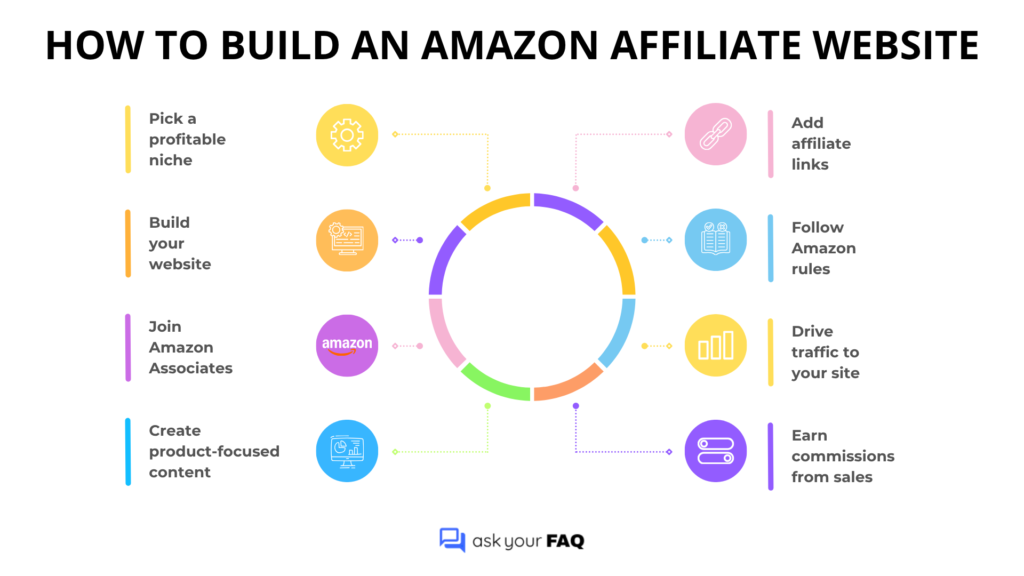
36. How to build an Amazon affiliate website?
To build an Amazon affiliate website, choose a niche, create a website, join the Amazon Associates program, and publish content such as product reviews or buying guides with affiliate links. Earnings come when visitors click your links and make purchases. Success depends on targeted traffic, useful content, and following Amazon’s affiliate rules.
Conclusion
Amazon covers a wide range of services, and users often need quick answers for everyday issues such as orders, returns, payments, reviews, and seller tools. This Amazon FAQ blog brings together the most searched questions in one place, making it easier to find accurate information without searching through multiple pages.
Whether you are shopping, managing an account, or selling on Amazon, having clear answers helps save time and avoid common mistakes. Keep this blog resource handy whenever you need reliable guidance on using Amazon more effectively.